
library(sbt)
library(tidyverse)
library(reshape2)
library(DT)
theme_set(theme_bw())
simulation <- sbt_example_simulate()
data <- simulation$data
truth <- simulation$truth
selectivity_change_years <- function(data, fishery) {
fisheries <- c("LL1", "LL2", "LL3", "LL4", "Indonesian", "Australian", "CPUE")
fishery_index <- match(fishery, fisheries)
if (is.na(fishery_index)) {
stop("Unknown fishery: ", fishery, call. = FALSE)
}
which(data$sel_change_year_fy[fishery_index, ] != 0L) + data$first_yr - 1L
}Introduction
The sbt software is an R package (R Core Team 2026) that contains the CCSBT operating model (OM) coded using RTMB Kristensen (2026). This page provides examples using the sbt model.
Assessment context
This vignette demonstrates the mechanics of fitting and inspecting one RTMB implementation of the CCSBT operating model. The formal CCSBT stock assessment uses a reference set of operating models to represent structural uncertainty, with model grid choices and input data reviewed through the OMMP and ESC processes. The 2023 full assessment used data through 2022, a revised reference set of 108 operating models, and updated inputs for CPUE, gene tagging, CKMR, composition data, and unaccounted mortality (Hillary et al. 2023). That assessment built on the 2020 assessment, which was the first CCSBT full stock assessment to include the gene-tagging estimates of age-2 abundance (Hillary and Preece 2020).
The broader scientific and decision context is documented in the CCSBT Scientific Committee and OMMP meeting reports. The 2023 Scientific Committee report gives the stock-status advice from the full assessment (Commission for the Conservation of Southern Bluefin Tuna 2023), while the 2023 and 2024 OMMP reports document the operating-model and management-procedure technical review process (Anon. 2023, 2024). The current CCSBT public stock assessment summary links these reports to the Commission’s stock status advice and indicator review (Commission for the Conservation of Southern Bluefin Tuna 2026).
Load inputs
If you have not done so already, you will need to install the following R packages:
remotes::install_github("janoleko/RTMBdist")
remotes::install_github("andrjohns/StanEstimators")
remotes::install_github("noaa-afsc/SparseNUTS")
The sbt RTMB model is loaded along with several R functions using library(sbt). The tidyverse and reshape2 packages are used for data manipulation and plotting. The code theme_set(theme_bw()) alters the plot aesthetics of the entire article:
The normal workflow keeps configuration, optimisation, diagnostics, and posterior samples in one portable sbt_fit. The RTMB objective is built automatically and kept only in a session cache.
A realistic model example, not an assessment result
The bundled example retains the biological structure, fleet timing, dimensions, and observation types of the ESC31 base model. Its observations are fully simulated, and the saved maximum-likelihood estimate fits all 1,559 active parameters, including population, recruitment, selectivity, mortality, and close-kin parameters.
The example is sufficiently complete for learning the real fitting and diagnostic workflow, but its fitted values are not estimates of southern bluefin tuna stock status.
fit <- sbt_fit(data)
fit <- sbt_optimise(
  fit,
  n_passes = 2L,
  control = list(eval.max = 10000L, iter.max = 10000L),
  check = TRUE
)
sbt_fit_save(fit, "base-model.sbt.rds")

plot_cpue(fit)
plot_recruitment(fit)
Model setup
Start the portable fit from model data. Package defaults for parameters, priors, map, and bounds are resolved when they are first needed. Calling sbt_add_parameters() explicitly makes those defaults available for review or targeted overrides. When starting from the preprocessing input list, use sbt_fit(data_in = data_in); this is equivalent to sbt_fit(get_data(data_in = data_in)) but keeps the public workflow in one fit object.
fit <- sbt_fit(data, metadata = list(run = "package vignette"))
fit <- sbt_add_parameters(fit)
parameters <- fit$parameters
names(parameters)
[1] "par_log_B0" "par_log_psi" "par_log_m10"
[4] "par_log_m30" "par_mc" "par_log_h"
[7] "par_log_sigma_r" "par_log_cpue_q" "par_cpue_creep"
[10] "par_log_cpue_sigma" "par_log_cpue_omega" "par_log_aerial_tau"
[13] "par_log_aerial_sel" "par_log_troll_tau" "par_log_gt_q"
[16] "par_log_hsp_q" "pop_od" "hsp_od"
[19] "gt_od" "par_log_tag_H_factor" "par_log_af_alpha"
[22] "par_log_lf_alpha" "par_sel_rho_y" "par_sel_rho_a"
[25] "par_log_sel_sigma" "par_log_sel_1" "par_log_sel_2"
[28] "par_log_sel_3" "par_log_sel_4" "par_log_sel_5"
[31] "par_log_sel_6" "par_log_sel_7" "par_rdev_y" Use overrides to change selected parameters while retaining the complete default structure:
fit <- sbt_add_parameters(fit, overrides = list(par_log_h = log(0.7)))The selectivity correlation hyper-parameters are stored on the model scale in parameters. Use sel_rho_to_par() when setting these values and sel_rho_from_par() when reporting them:
selectivity_hyperparameters <- tibble(
  Fishery = c("LL1", "LL2", "LL3", "LL4", "Indonesia", "Australia", "CPUE"),
  rho_year = sel_rho_from_par(parameters$par_sel_rho_y),
  rho_age = sel_rho_from_par(parameters$par_sel_rho_a),
  sigma = exp(parameters$par_log_sel_sigma)
) |>
  mutate(across(where(is.numeric), ~ round(.x, 3)))

knitr::kable(
  selectivity_hyperparameters,
  rownames = FALSE,
  align = c("l", "r", "r", "r")
)| Fishery | rho_year | rho_age | sigma |
|---|---|---|---|
| LL1 | 0.70 | 0.90 | 0.31 |
| LL2 | 0.70 | 0.50 | 0.50 |
| LL3 | 0.50 | 0.50 | 0.75 |
| LL4 | 0.50 | 0.50 | 0.75 |
| Indonesia | 0.98 | 0.98 | 0.12 |
| Australia | 0.50 | 0.50 | 1.13 |
| CPUE | 0.95 | 0.90 | 0.23 |
There is a lot of flexibility in specifying priors now. The default priors are loaded using get_priors and the evaluate_priors function can be used to check that the priors are doing what you expect:
fit <- sbt_add_priors(fit)
evaluate_priors(parameters = fit$parameters, priors = fit$data$priors)
[1] 46.75201-
par_log_psi: \log(\psi) \sim \mathrm{Normal}\left(\log(1.75),\,0.122^2\right). -
par_log_m10: \log(M_{10}) \sim \mathrm{Normal}\left(\log(0.1),\,0.6^2\right). -
par_log_m30: \log(M_{30}) \sim \mathrm{Normal}\left(\log(0.4574),\,1.5^2\right). -
par_mc: m_c \sim \mathrm{Normal}\left(-1,\,0.3^2\right). -
par_log_h: \log(h) \sim \mathrm{Normal}\left(\log(0.55),\,0.5455^2\right). -
par_log_cpue_omega: \log(\omega_{\mathrm{CPUE}}) \sim \mathrm{Normal}\left(\log(0.875),\,0.1143^2\right). -
par_log_sigma_r: \log(\sigma_R) \sim \mathrm{Normal}\left(\log(0.6),\,1^2\right). -
par_cpue_creep: c_{\mathrm{CPUE}} \sim \mathrm{Normal}\left(0.005,\,0.01^2\right). -
par_sel_rho_y: \mathrm{logit}\left((\rho_{\mathrm{sel},y}+1)/2\right) \sim \mathrm{Normal}\left(3.664,\,1^2\right). -
par_sel_rho_a: \mathrm{logit}\left((\rho_{\mathrm{sel},a}+1)/2\right) \sim \mathrm{Normal}\left(3.664,\,1^2\right). -
par_log_sel_sigma: \log(\sigma_{\mathrm{sel}}) \sim \mathrm{Normal}\left(\log(0.5),\,1^2\right).
Use RTMB’s map option to turn parameters on or off:
fit <- sbt_add_map(fit)Other optional configuration setters are sbt_add_bounds(), sbt_add_random(), and sbt_add_makeadfun_args(). Any setter that changes the scientific objective invalidates downstream fitted state so that an old optimum or posterior cannot silently be reused.
sbt_optimise() and sbt_mcmc() build automatically. An explicit build is useful when reviewing the active parameter layout or initial objective:
fit <- sbt_build_object(fit)
obj <- sbt_obj(fit)
The parameters that are being estimated can be viewed using:
 [1] "par_log_B0"     "par_log_m10"    "par_log_m30"    "par_log_cpue_q"
 [5] "par_log_sel_1"  "par_log_sel_2"  "par_log_sel_3"  "par_log_sel_4"
 [9] "par_log_sel_5"  "par_log_sel_6"  "par_log_sel_7"  "par_rdev_y"
The objective function value given the initial parameter values is:
obj$fn(obj$par)[1] 8122.876The resolved bounds are stored with the fit:
head(data.frame(lower = fit$bounds$lower, upper = fit$bounds$upper)) lower upper
par_log_B0 11.512925 20.7232658
par_log_m10 -3.540459 -1.5606477
par_log_m30 -1.609438 -0.3566749
par_log_cpue_q -9.210340 9.2103404
par_log_sel_1[1] -Inf Inf
par_log_sel_1[2] -Inf InfOptimisation
sbt_optimise() runs sequential nlminb passes and stores the selected optimum, complete RTMB last.par.best, bounds, configuration, and diagnostics. The default is two passes followed by check_mle():
fit <- sbt_optimise(
  fit,
  n_passes = 2L,
  control = list(eval.max = 10000L, iter.max = 10000L),
  check = TRUE
)
Set check = FALSE to retain an expensive result without immediately running the diagnostic gate, then check it later. Printing the fit reports that the MLE check has not yet run:
fit <- sbt_optimise(
  fit,
  control = list(eval.max = 10000L, iter.max = 10000L),
  check = FALSE
)
fit
fit <- check_mle(fit)
Repeated calls to sbt_optimise() start from the objective’s authoritative last.par.best. If a posterior is already stored, it is preserved and marked as predating the new optimum rather than silently discarded.
The remaining examples use the bundled full simulated MLE so this vignette does not repeat the lengthy optimisation while rendering. This is the result that would be produced by the workflow above.
Warning: Dependency versions differ: RTMBdist, TMB
Warning: Dependency versions differ: RTMBdist, TMB
Saving a fitted model
Do not save the RTMB obj directly. It contains transient closures and external state that may no longer work after sbt or RTMB changes. Every stage of an sbt_fit is portable, including an unchecked optimum or posterior. The fit stores the processed data, resolved configuration, selected optimizer result, compact diagnostics, MCMC attempts, and validation records. Transient objectives, reports, Hessians, and full estimability decompositions are not serialized.
sbt_fit_save(fit, "base-model.sbt.rds")sbt_fit_read() upgrades supported older schemas in memory without optimising or sampling. By default it also rebuilds the compatible transient objective; use rebuild = FALSE for lightweight inspection. The report is available with sbt_fit_report():
fit <- sbt_fit_read("base-model.sbt.rds", strict = TRUE)
report <- sbt_fit_report(fit)
parameters <- make_parameter_table(fit)
obj <- sbt_obj(fit) # only when an external API requires RTMB
sampling_obj <- sbt_obj(fit, fresh = TRUE) # isolated, mutable objective
Plotting and diagnostic APIs
The functions below demonstrate the package’s plotting interface using the full simulated MLE. Simulated observations and fitted CPUE are shown in Figure 1, with corresponding examples for the aerial survey (Figure 3), troll survey (Figure 4), and gene-tagging data (Figure 5). The conventional-tag fit is shown in Figure 6. Length-frequency comparisons for each longline fleet are shown in Figure 7, Figure 8, Figure 9, and Figure 10; the CPUE length-frequency fit is shown in Figure 11. Age composition fits are shown for the Indonesian fleet (Figure 12) and the Australian fleet (Figure 13).
These plots are genuine diagnostics for the fitted simulated example. They show how to inspect an assessment fit, but they must not be interpreted as CCSBT stock-assessment diagnostics.
plot_cpue(fit, nsim = 10)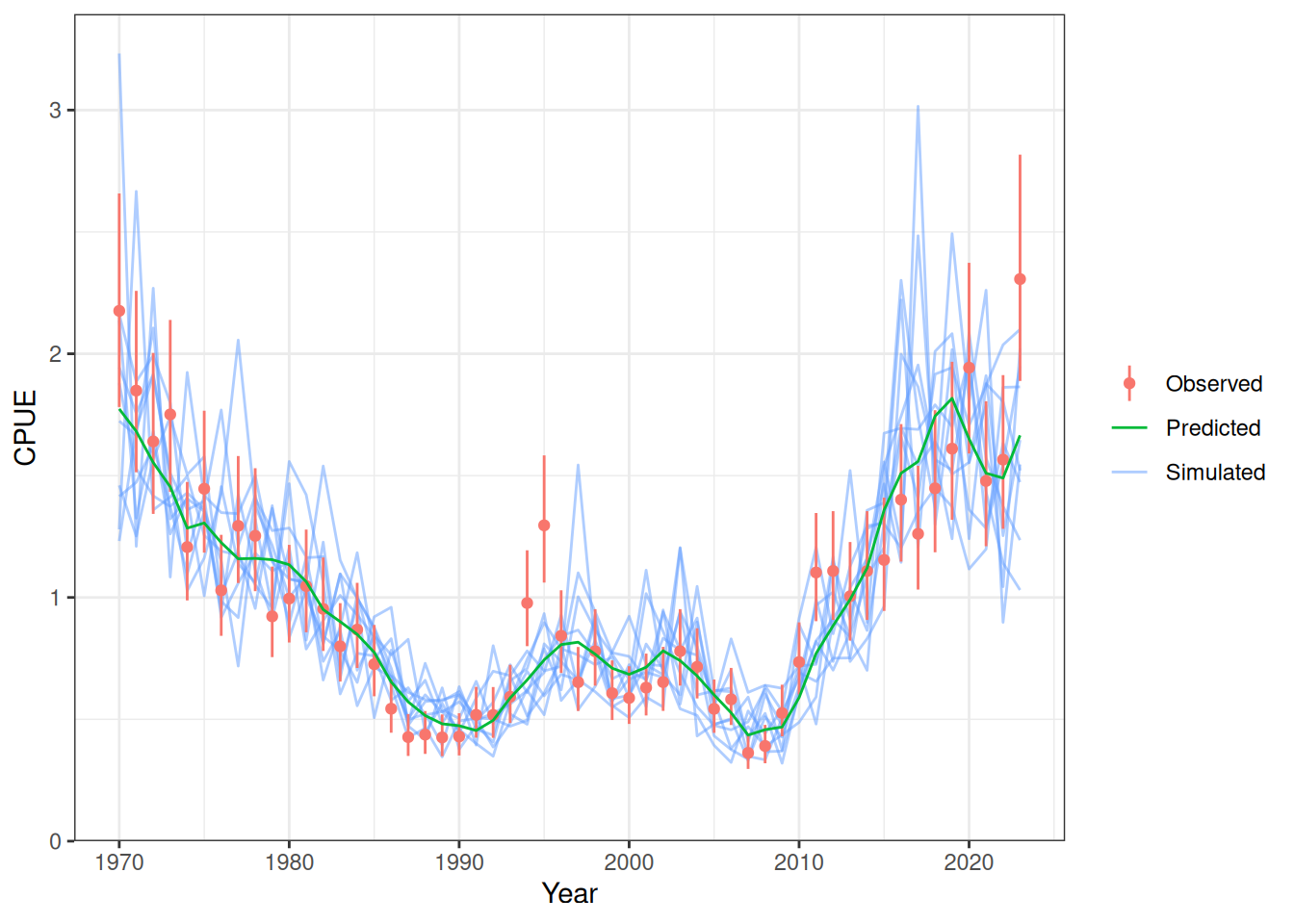
One-step-ahead (OSA) residuals
One-step-ahead residuals account for dependence introduced by sequential conditioning and are generally preferable to simple Pearson residuals.
plot_cpue_residuals(fit)
Diagnostic Summary:
  SDNR: 0.65431  (95% CI 0.55240-0.80267; Target: ~1.0)
  MAR:  0.44781  (Target: ~0.67)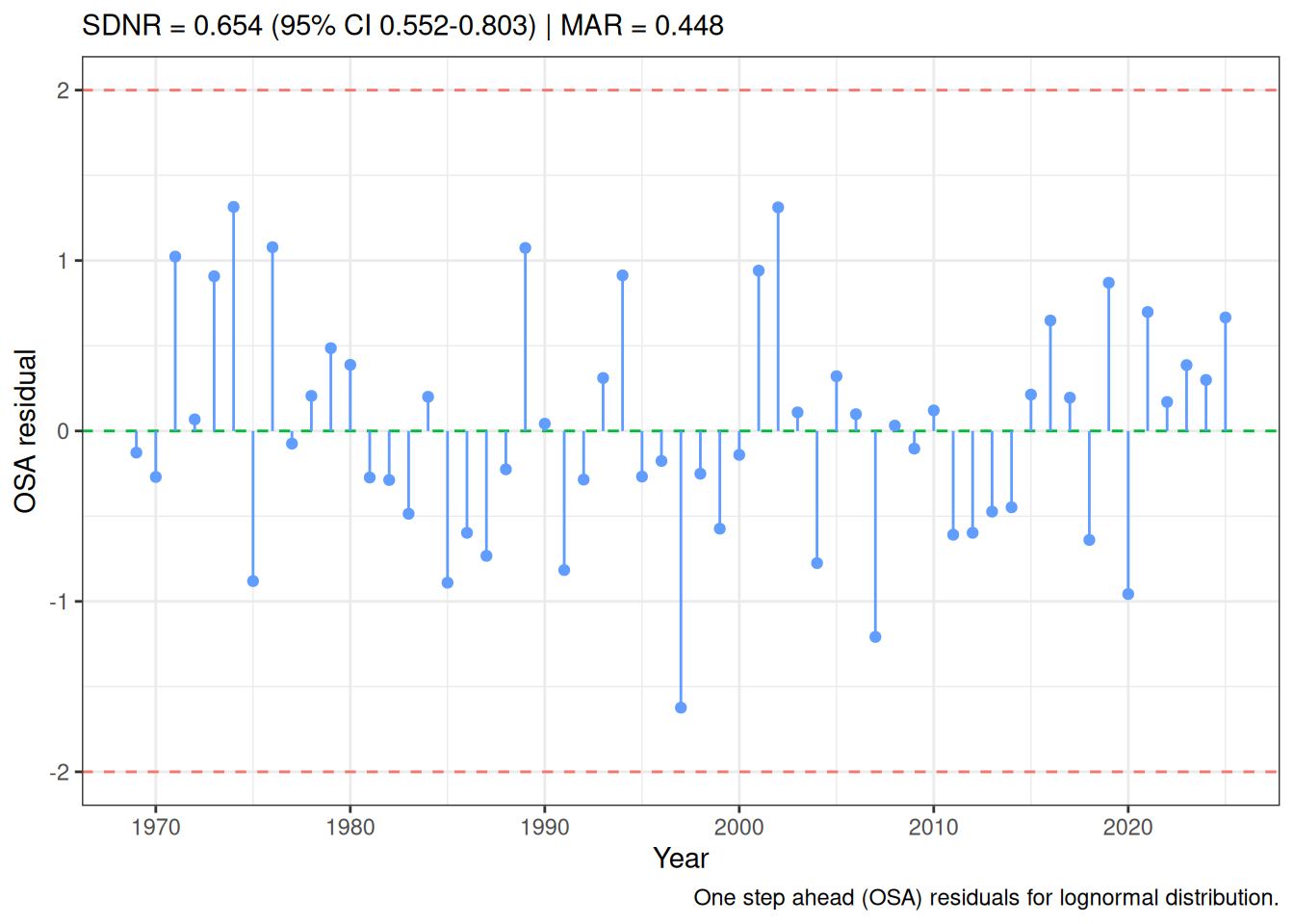
plot_aerial(fit)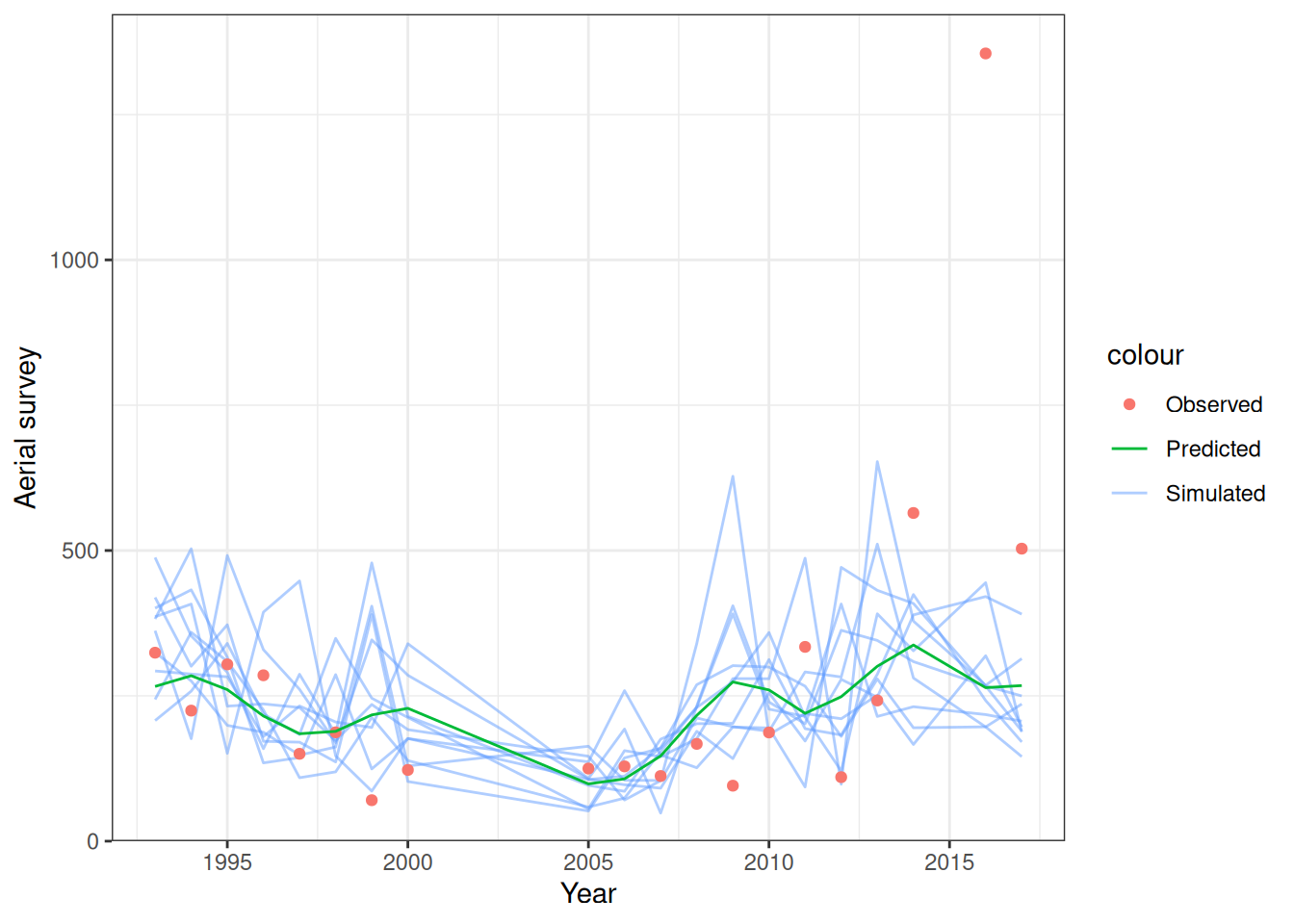
plot_troll(fit)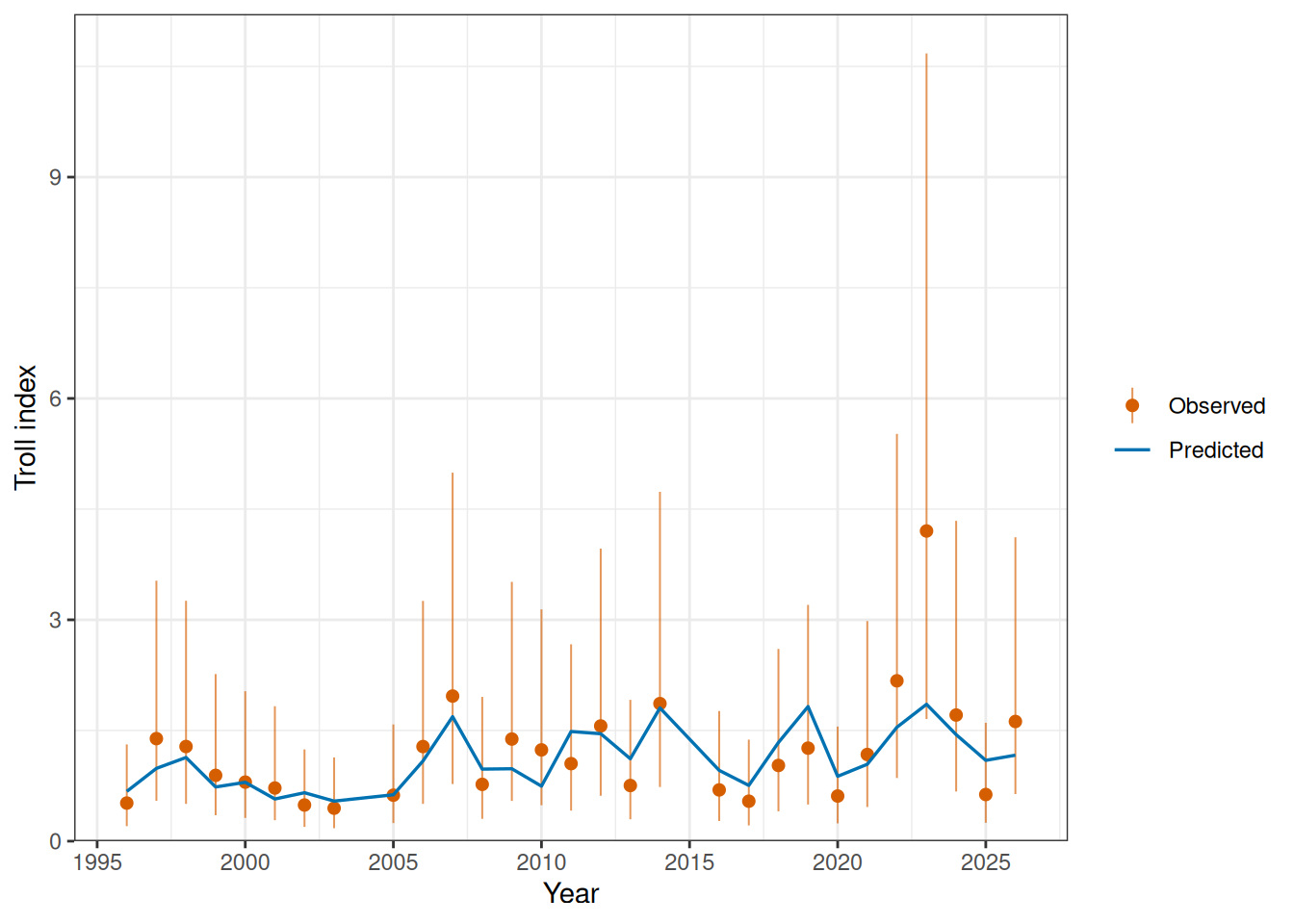
plot_gt(fit)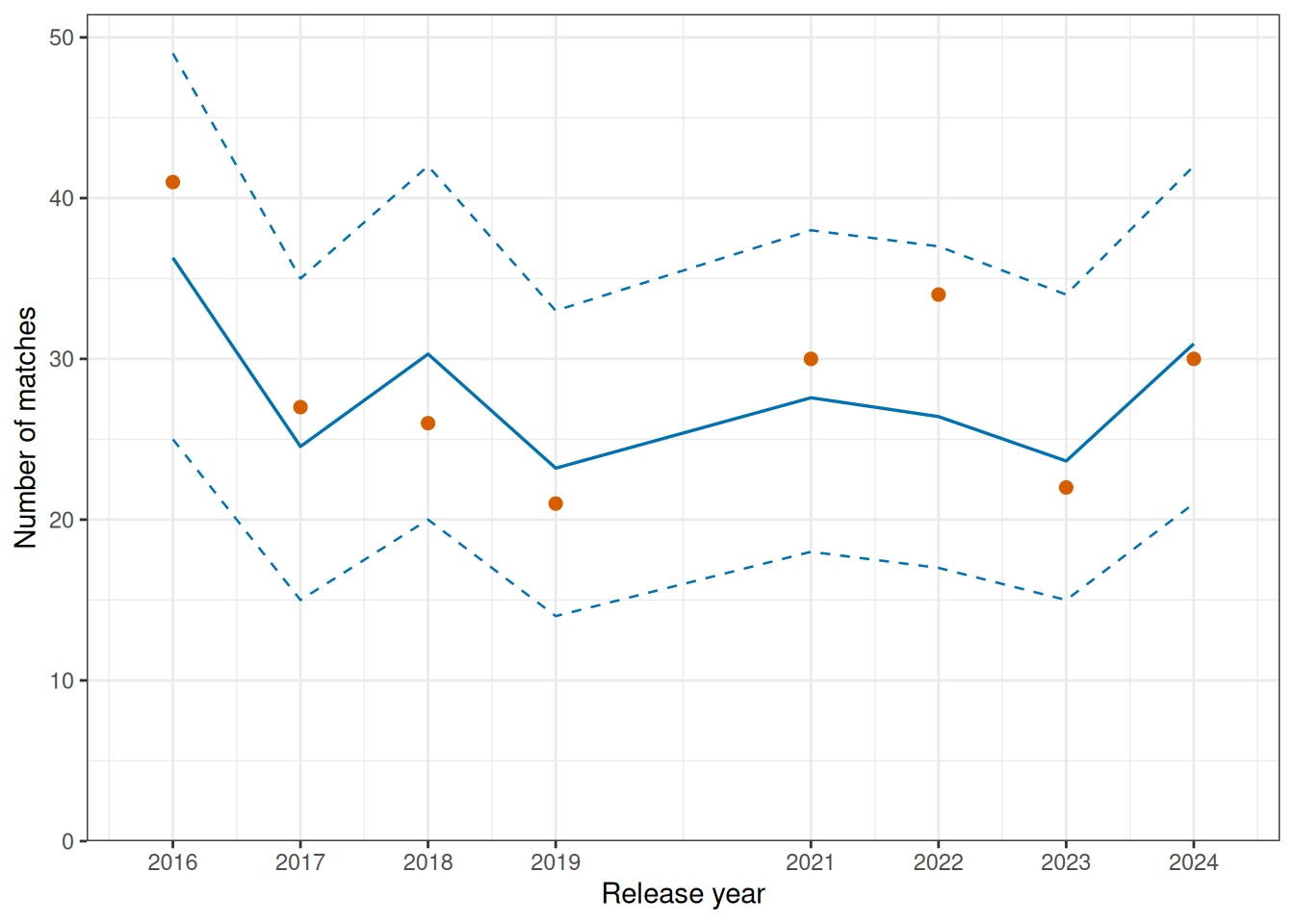
plot_tags(fit, ncol = 4)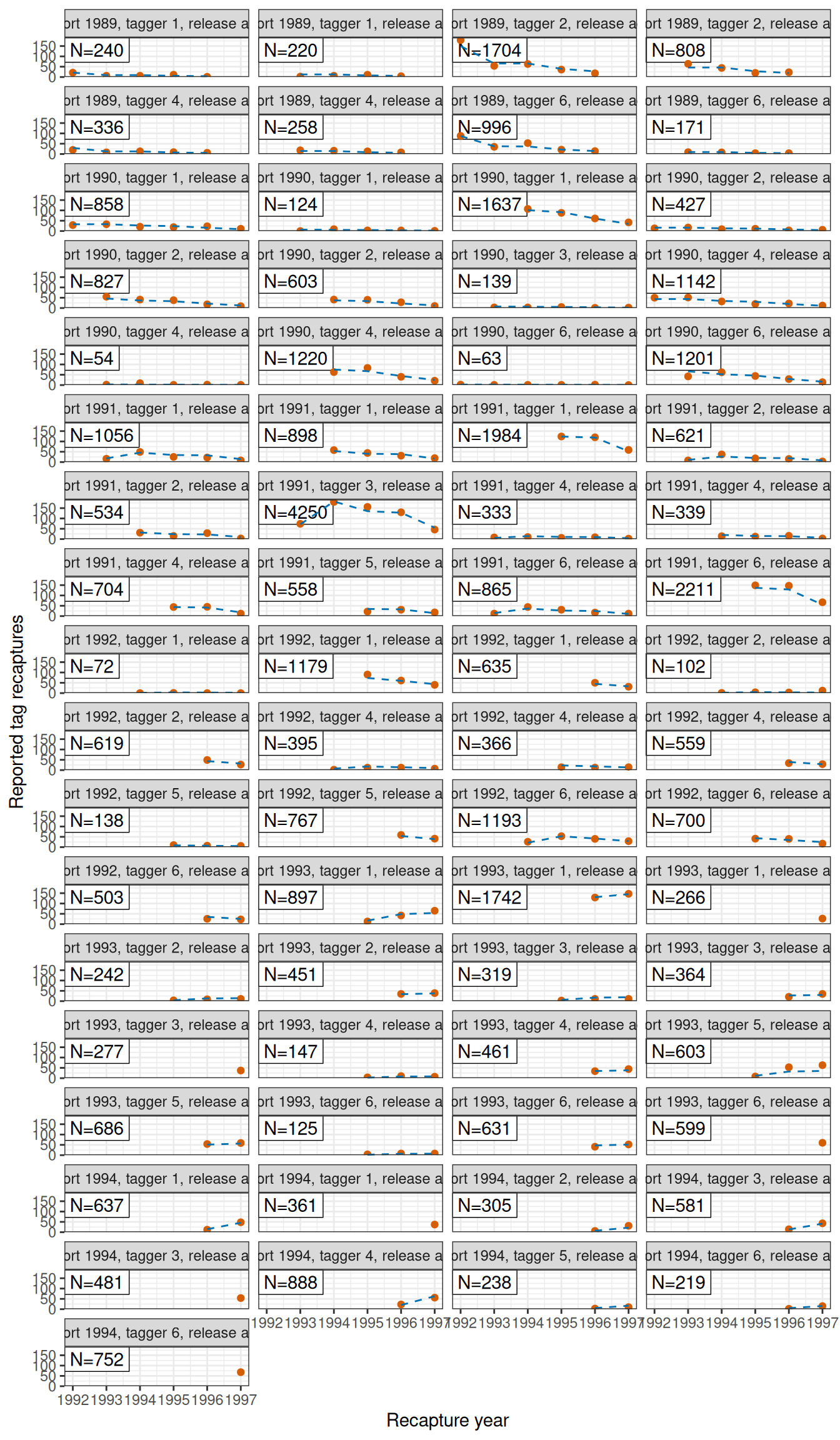
plot_lf(fit, fishery = "LL1", ncol = 5)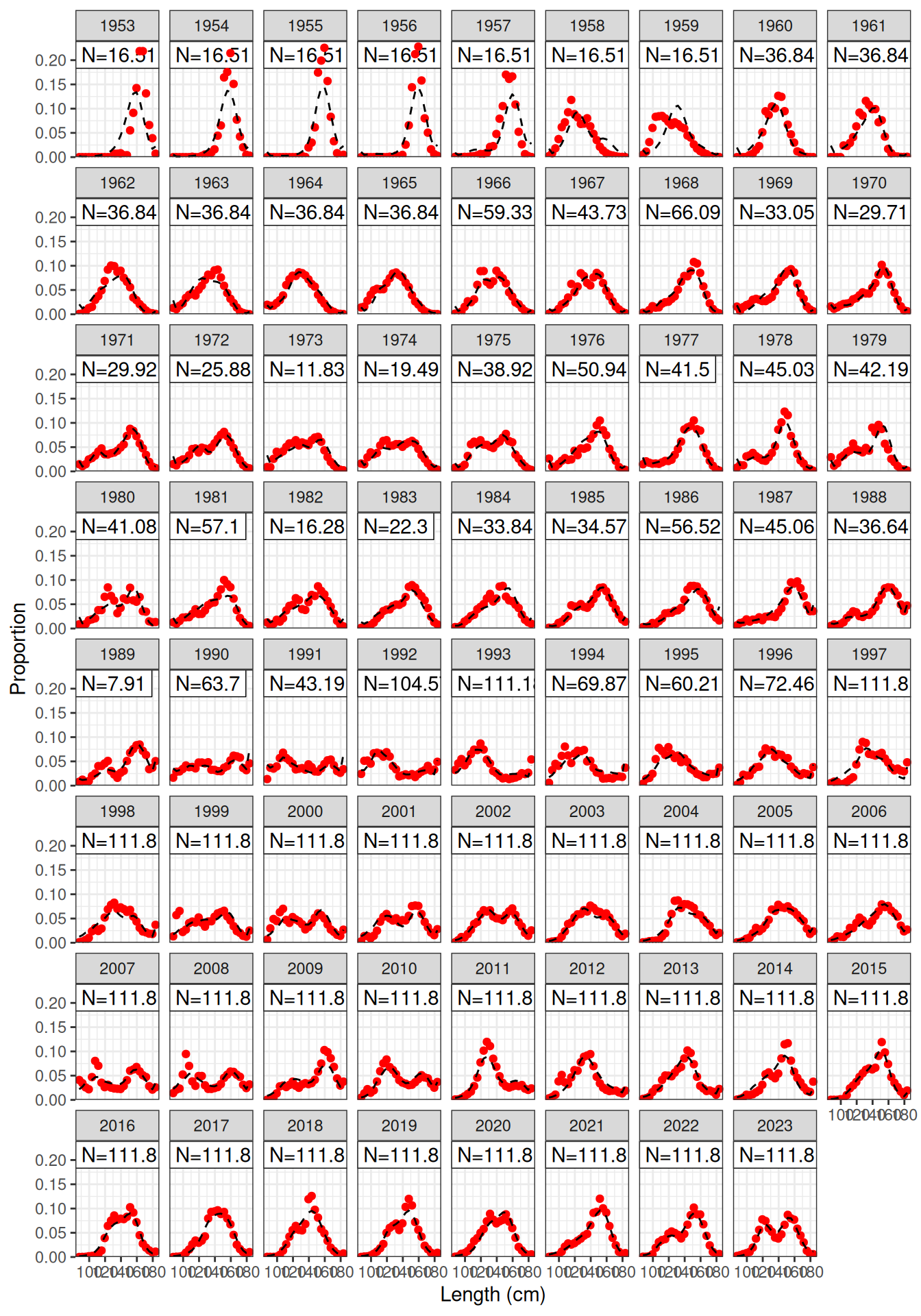
plot_lf(fit, fishery = "LL2", ncol = 5)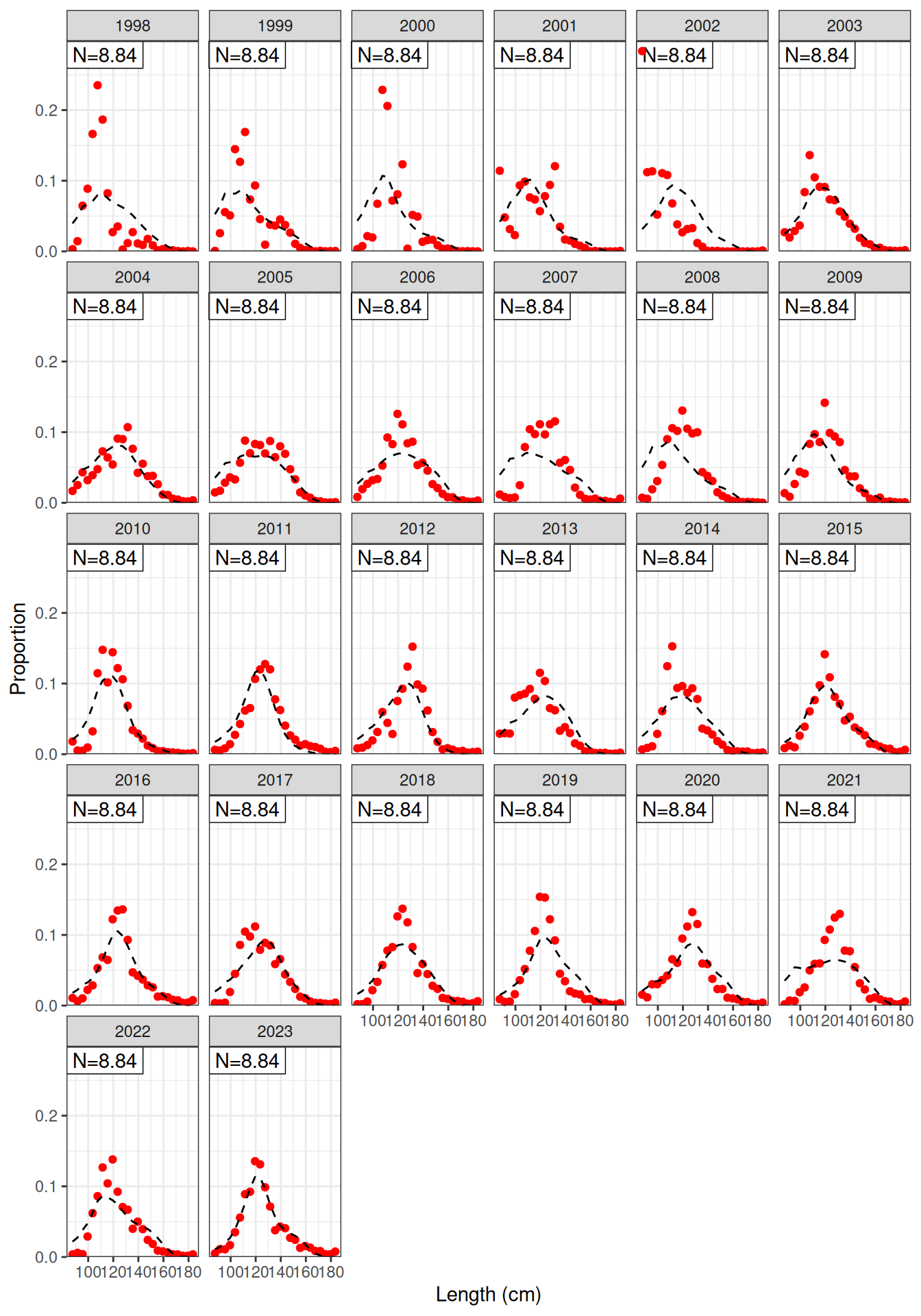
plot_lf(fit, fishery = "LL3", ncol = 5)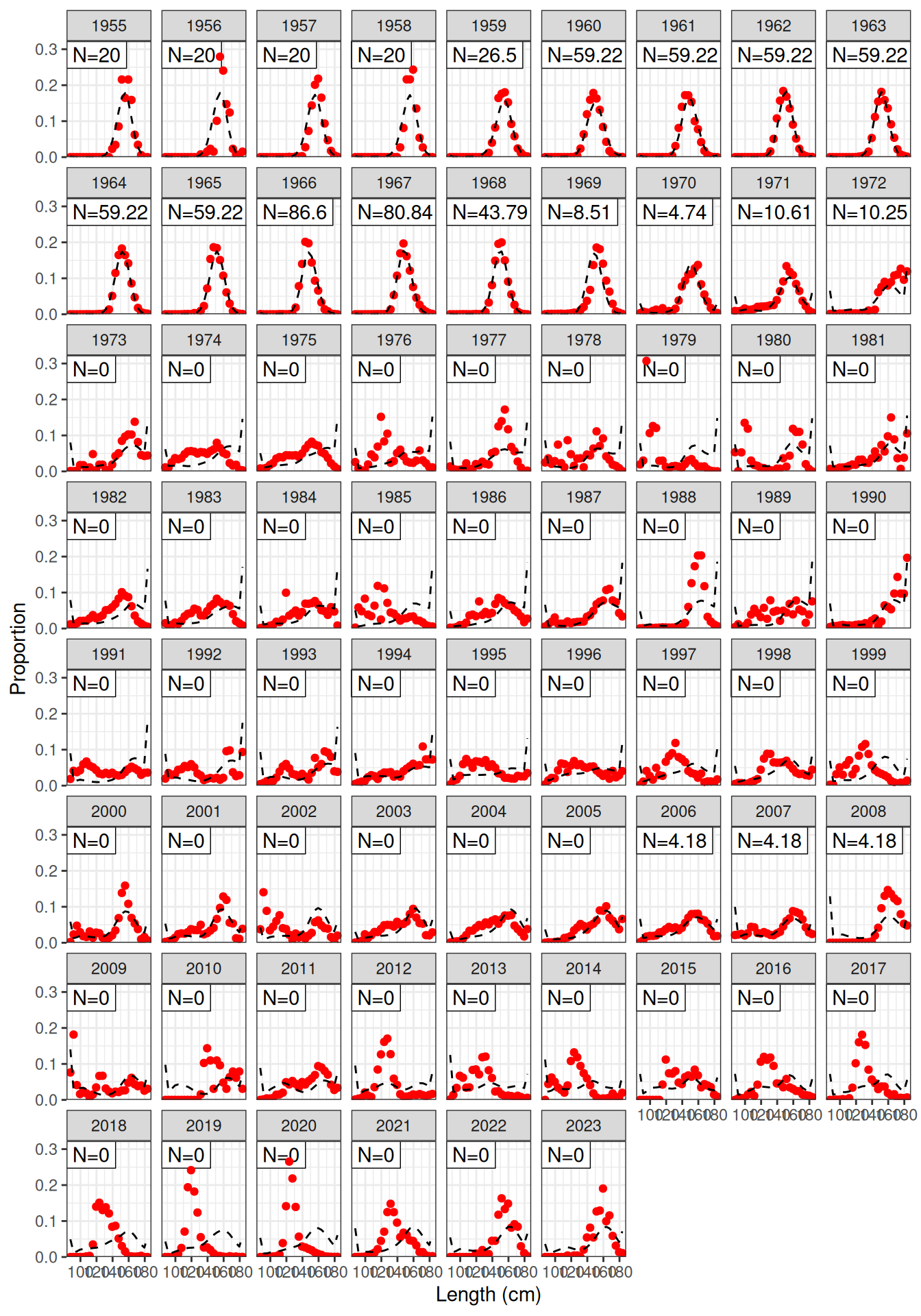
plot_lf(fit, fishery = "LL4", ncol = 5)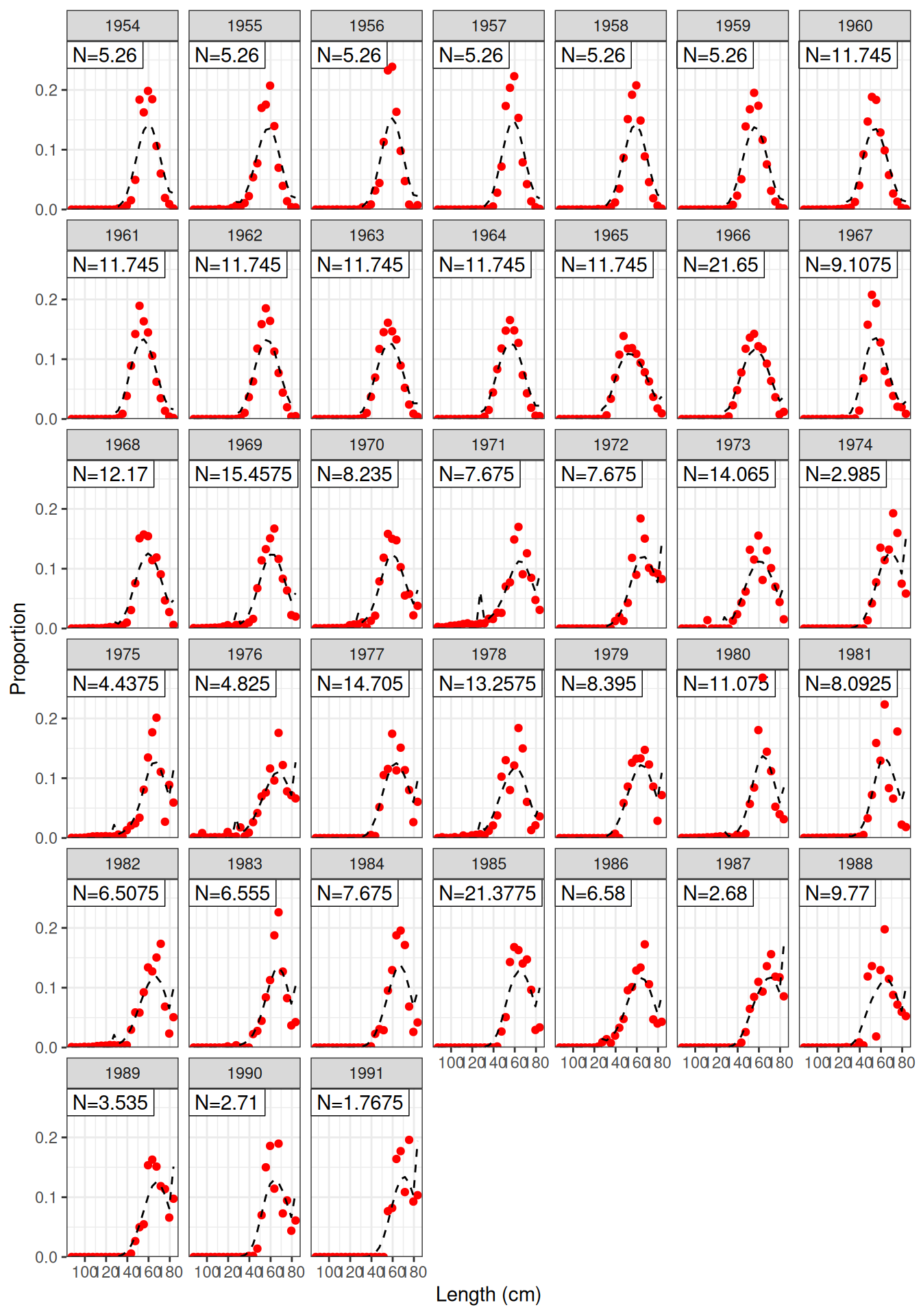
plot_lf(fit, fishery = "CPUE", ncol = 5)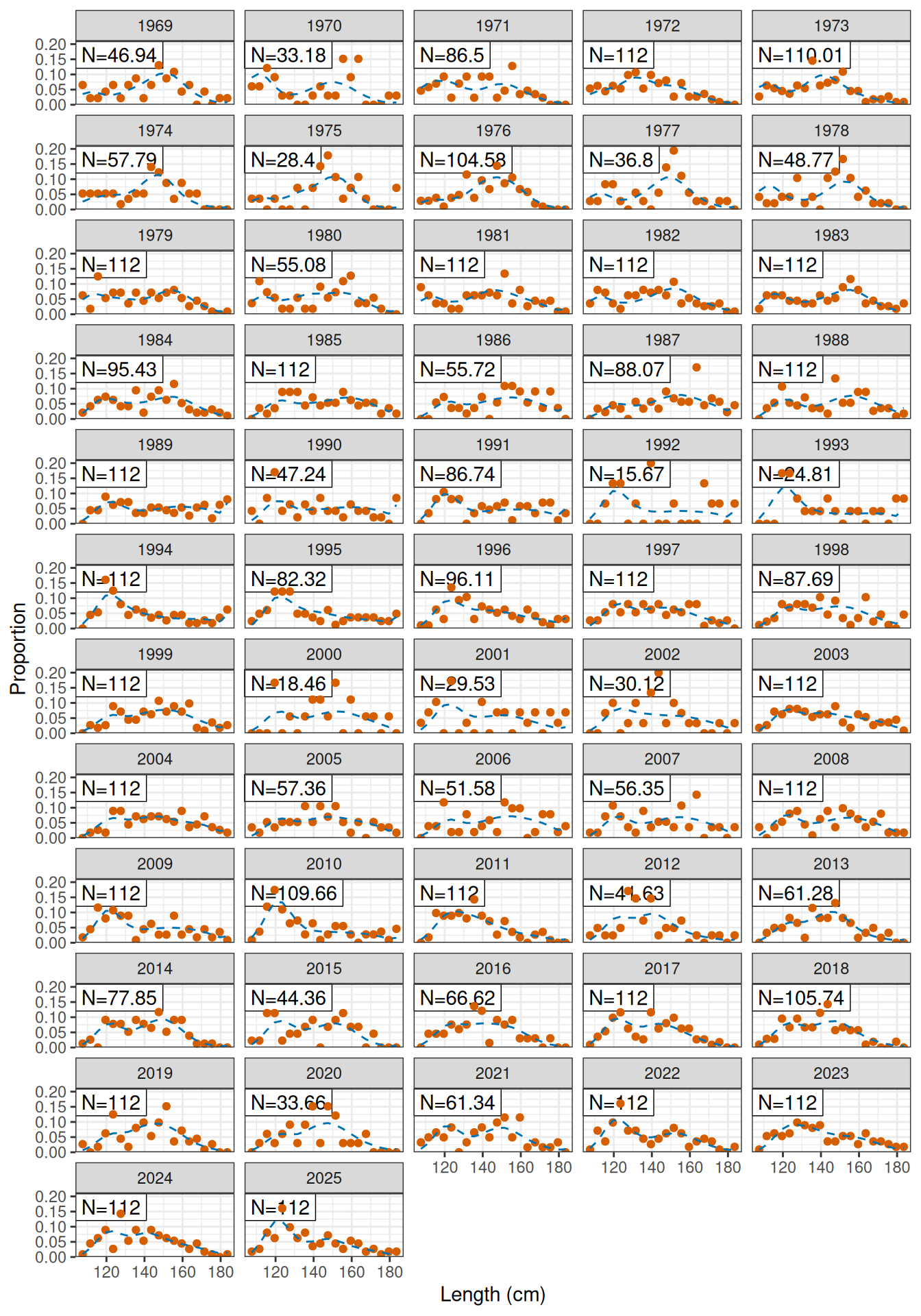
plot_af(fit, fishery = "Indonesian")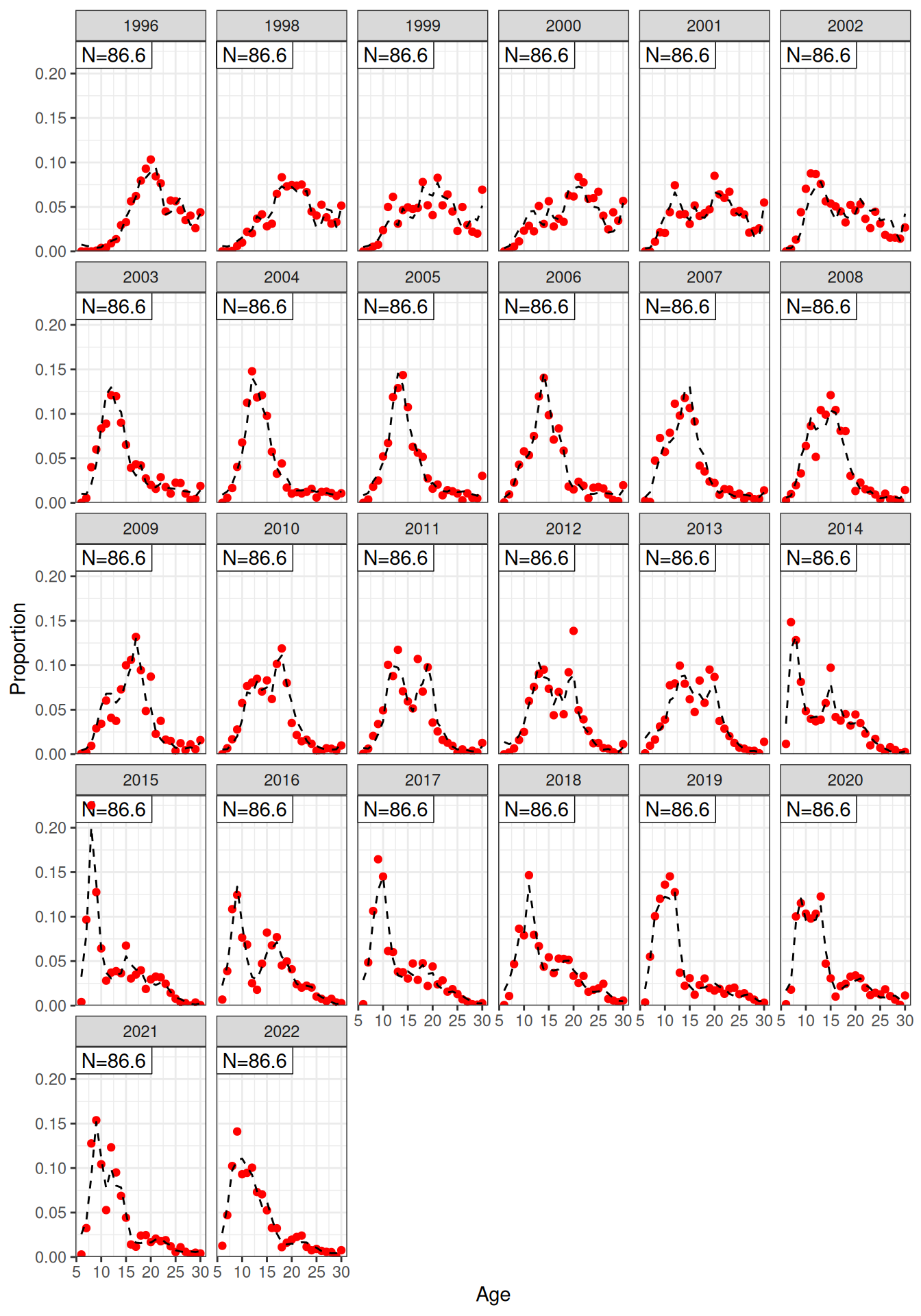
plot_af(fit, fishery = "Australian")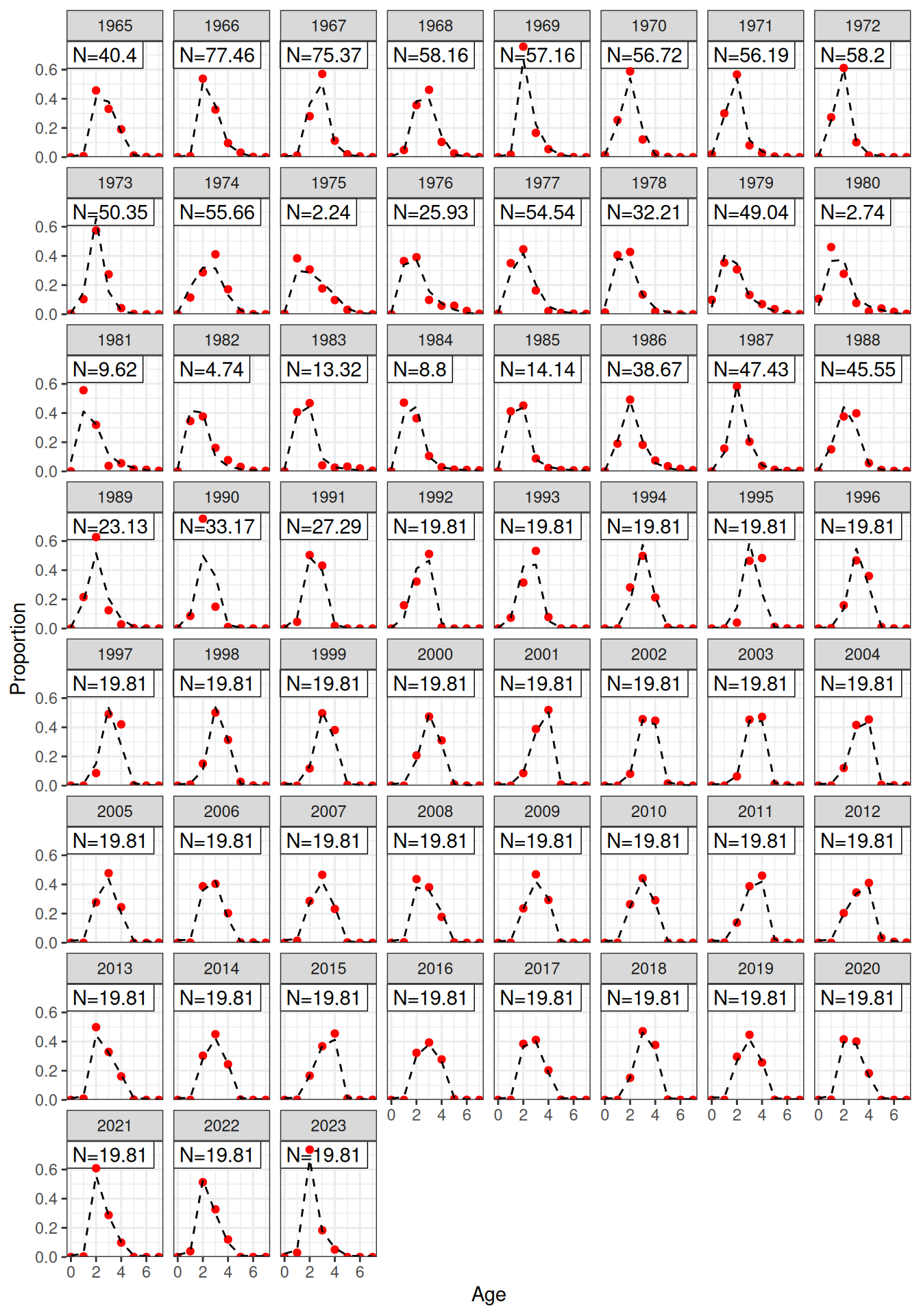
plot_catch(fit)[1] "The maximum catch difference was: 7.27595761418343e-12"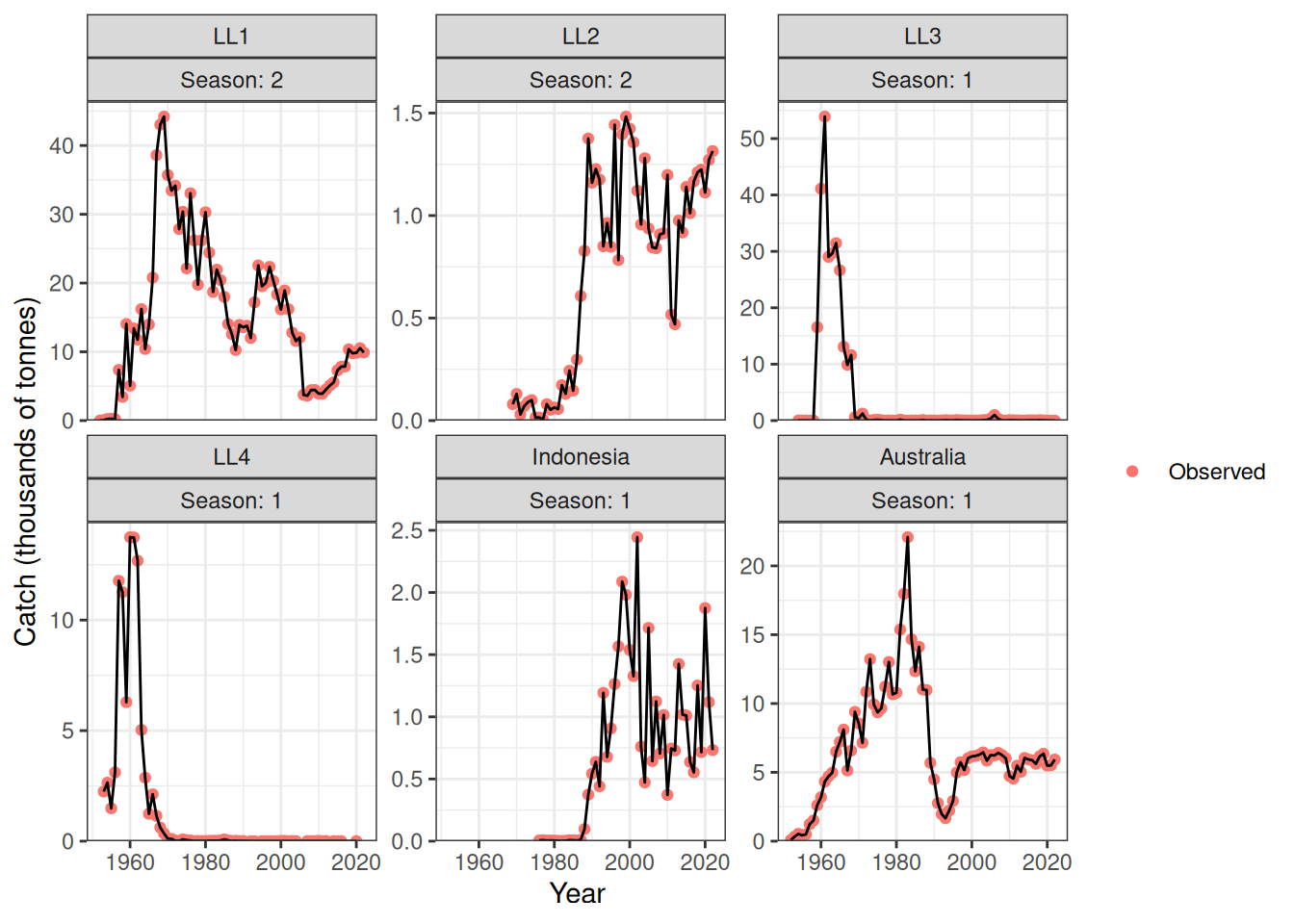
plot_catch(fit, plot_resid = TRUE)[1] "The maximum catch difference was: 7.27595761418343e-12"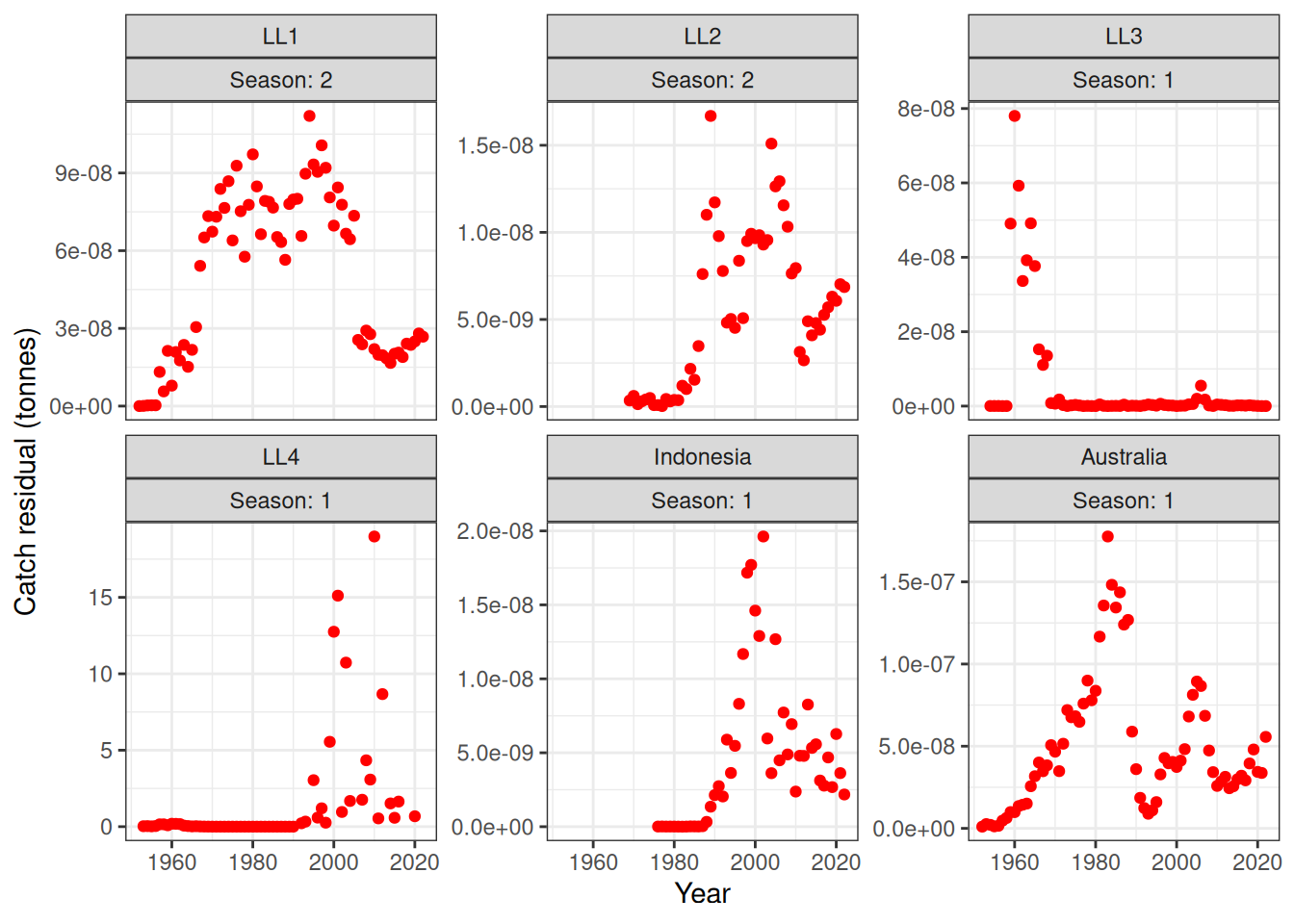
hsp_fit_plots$pop_by_juvenile_cohort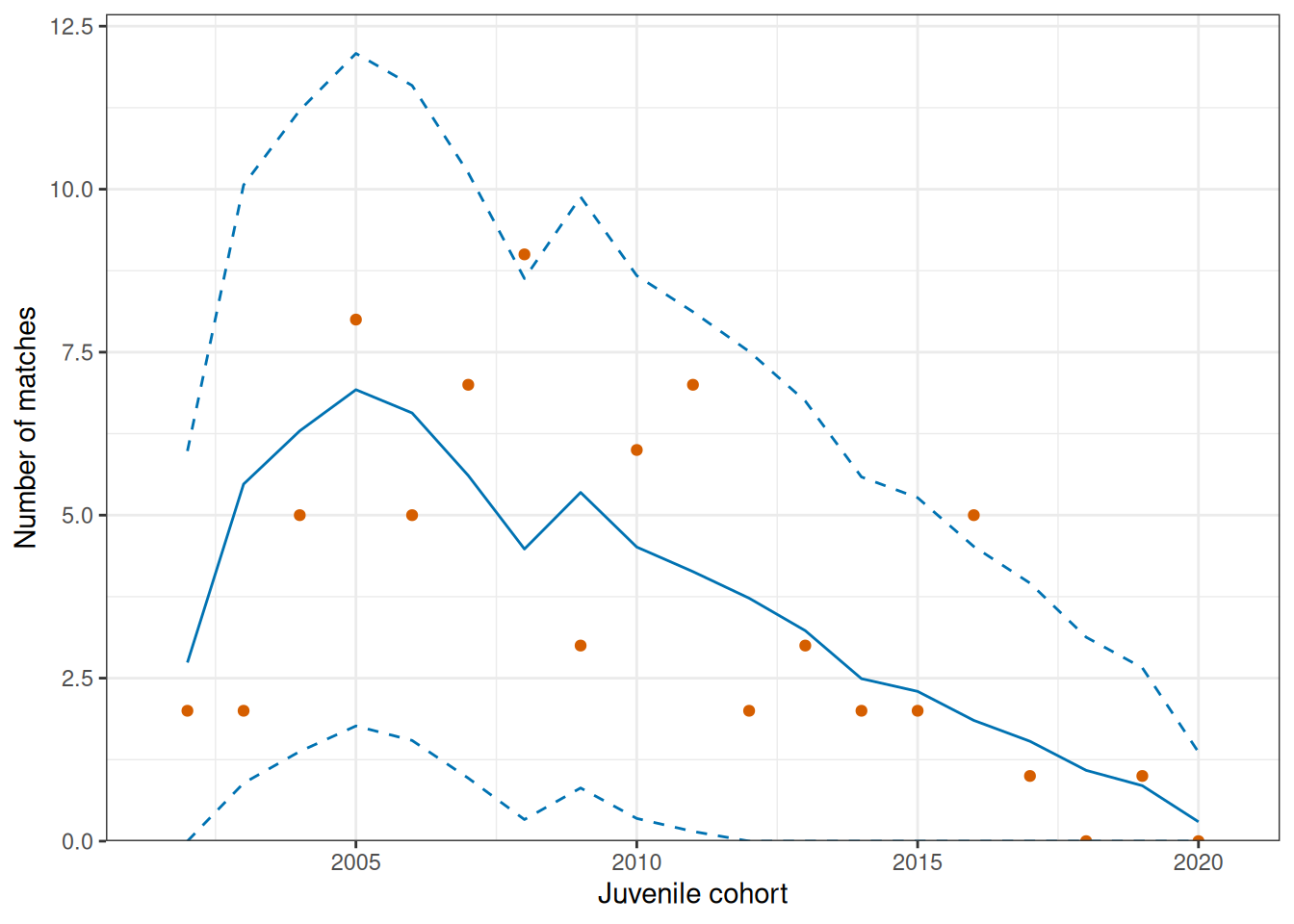
hsp_fit_plots$pop_by_adult_capture_age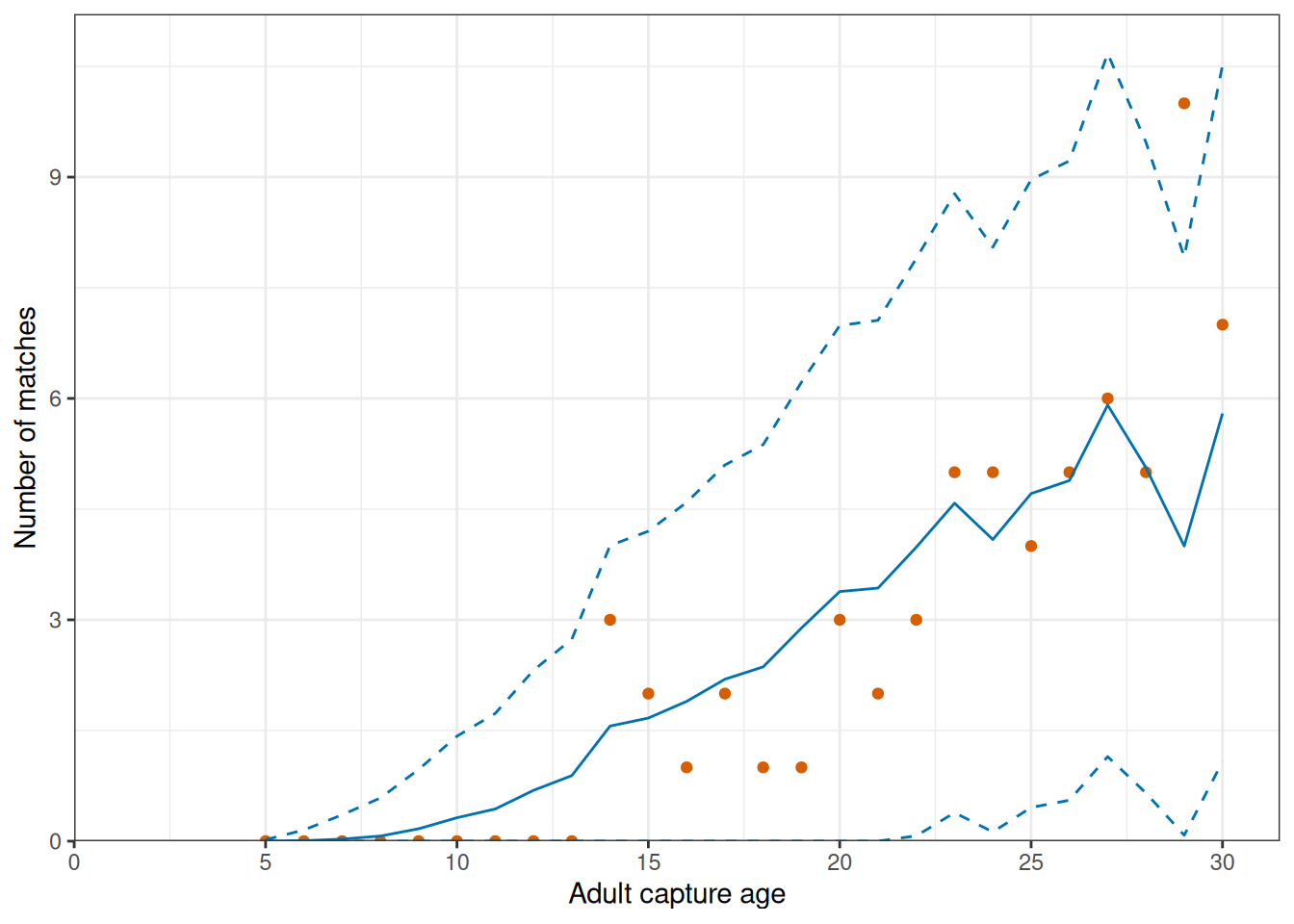
hsp_fit_plots$pop_by_adult_capture_year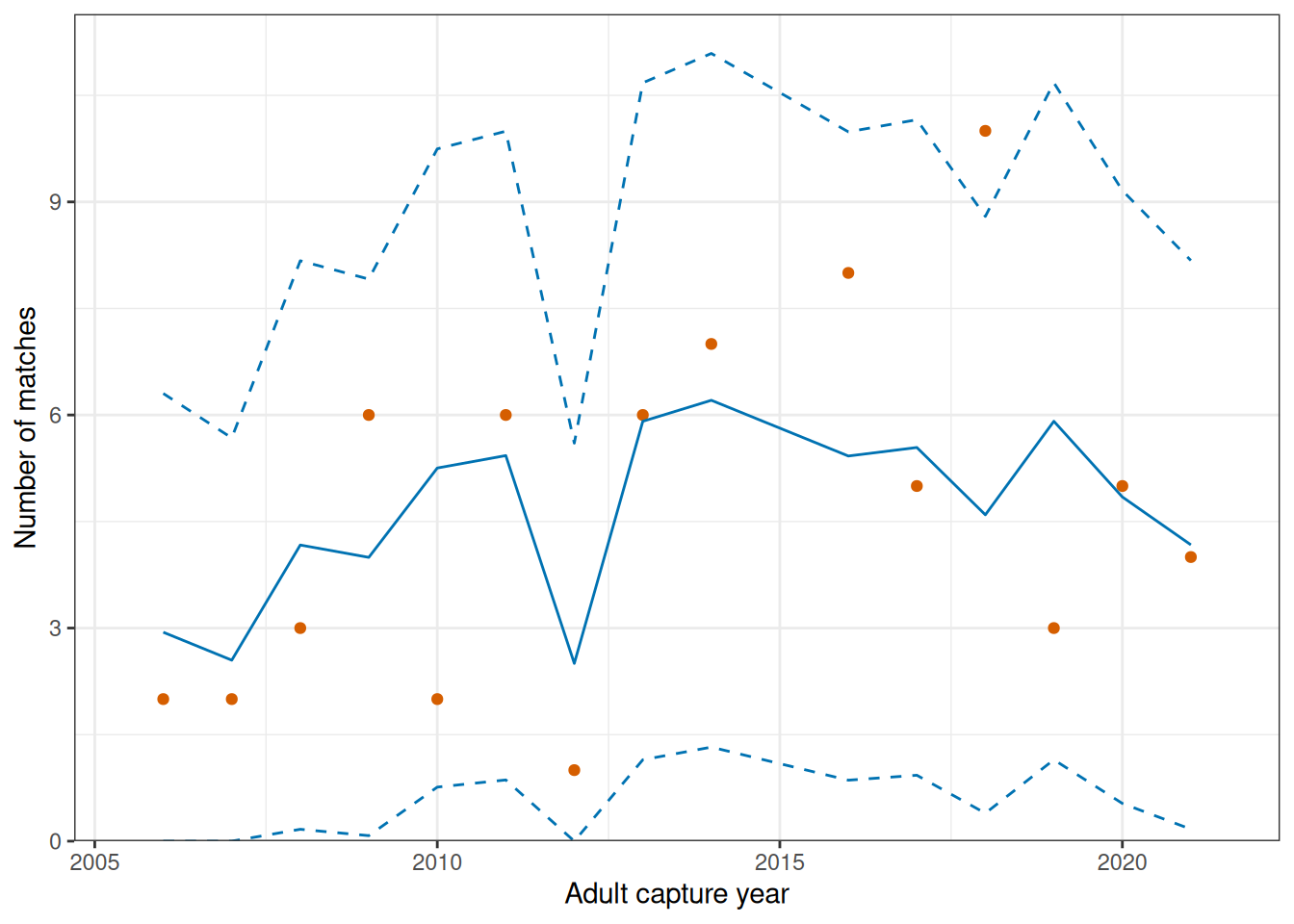
hsp_fit_plots$hsp_by_cohort_pair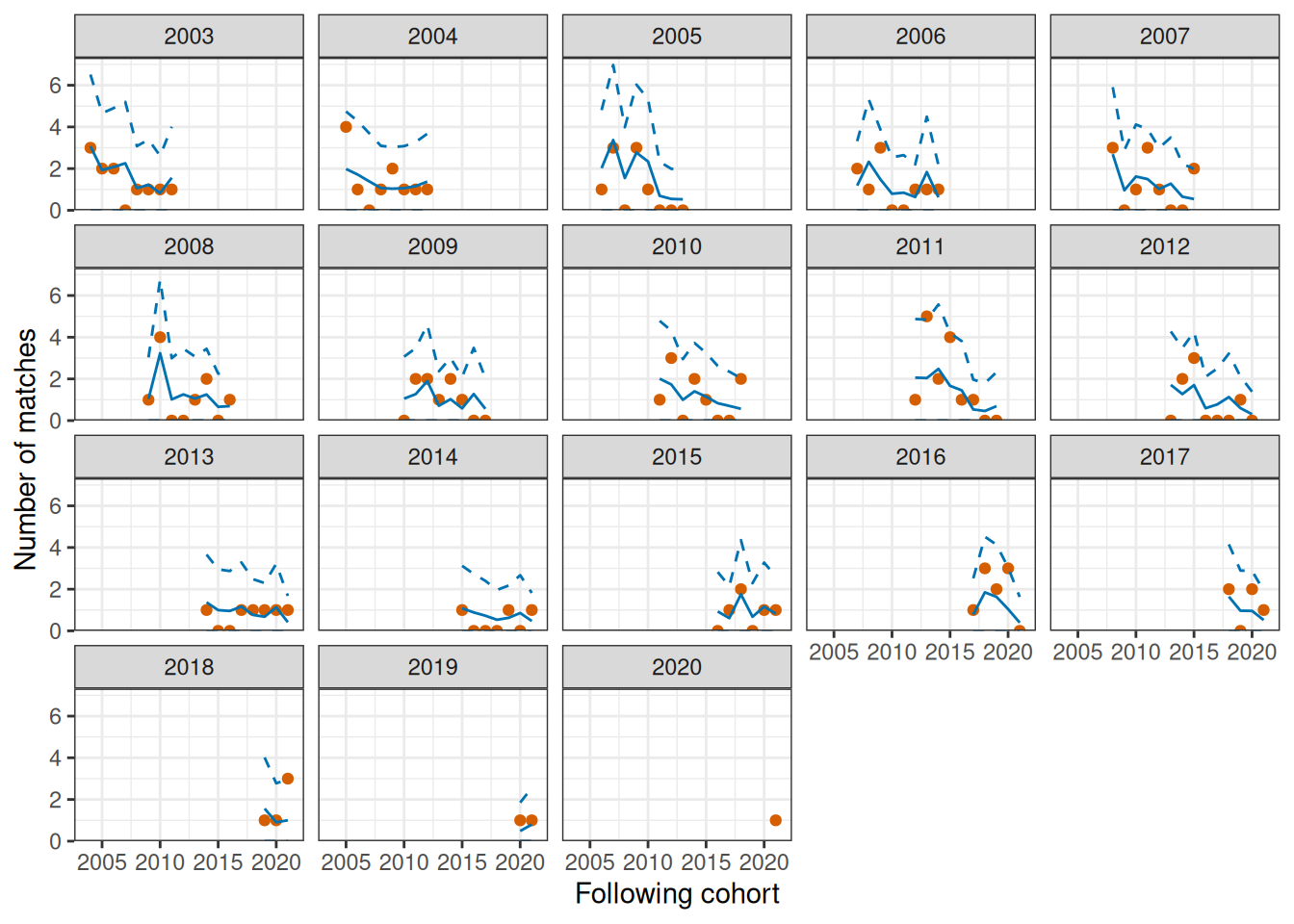
hsp_fit_plots$hsp_by_initial_cohort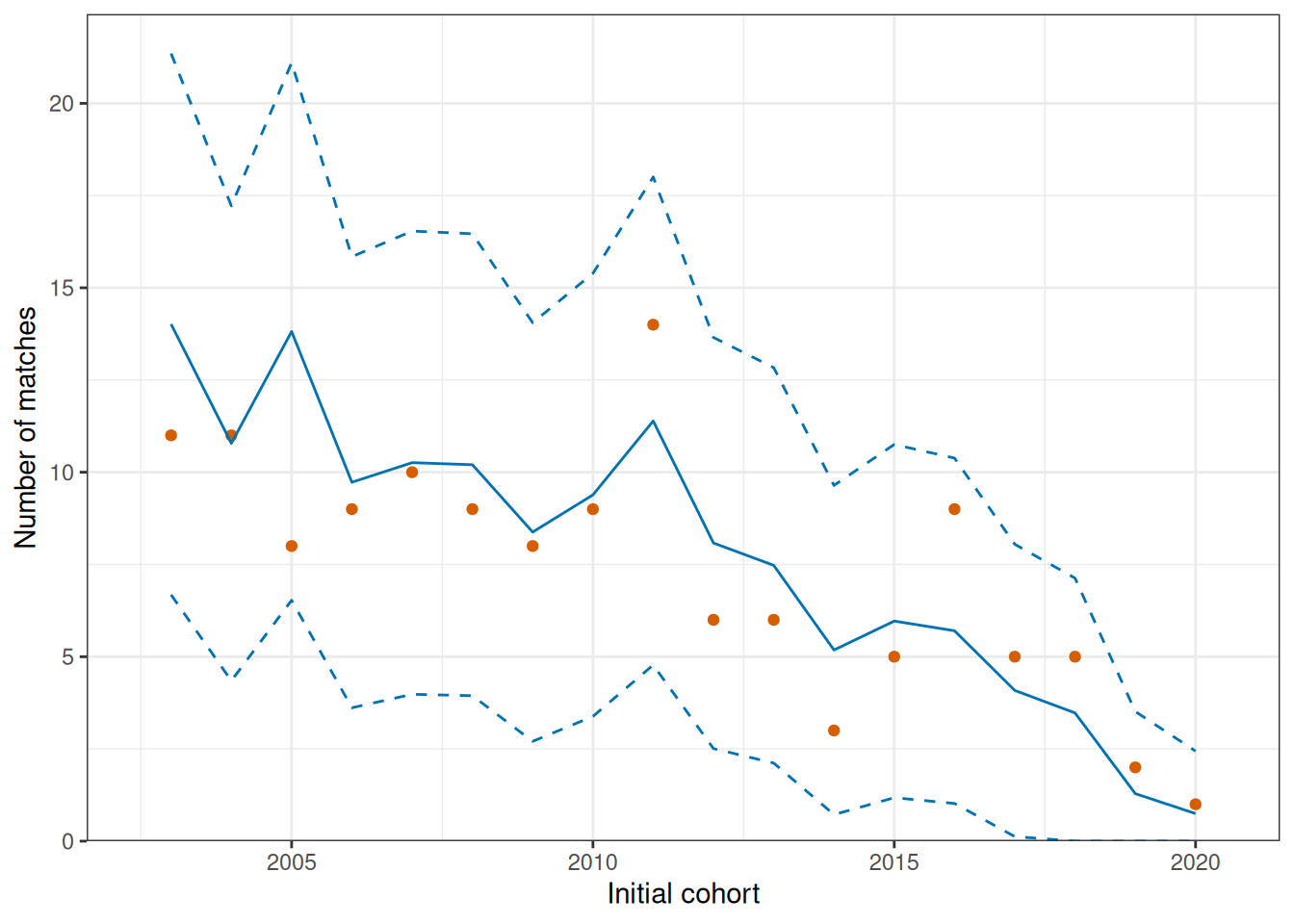
hsp_fit_plots$total_matches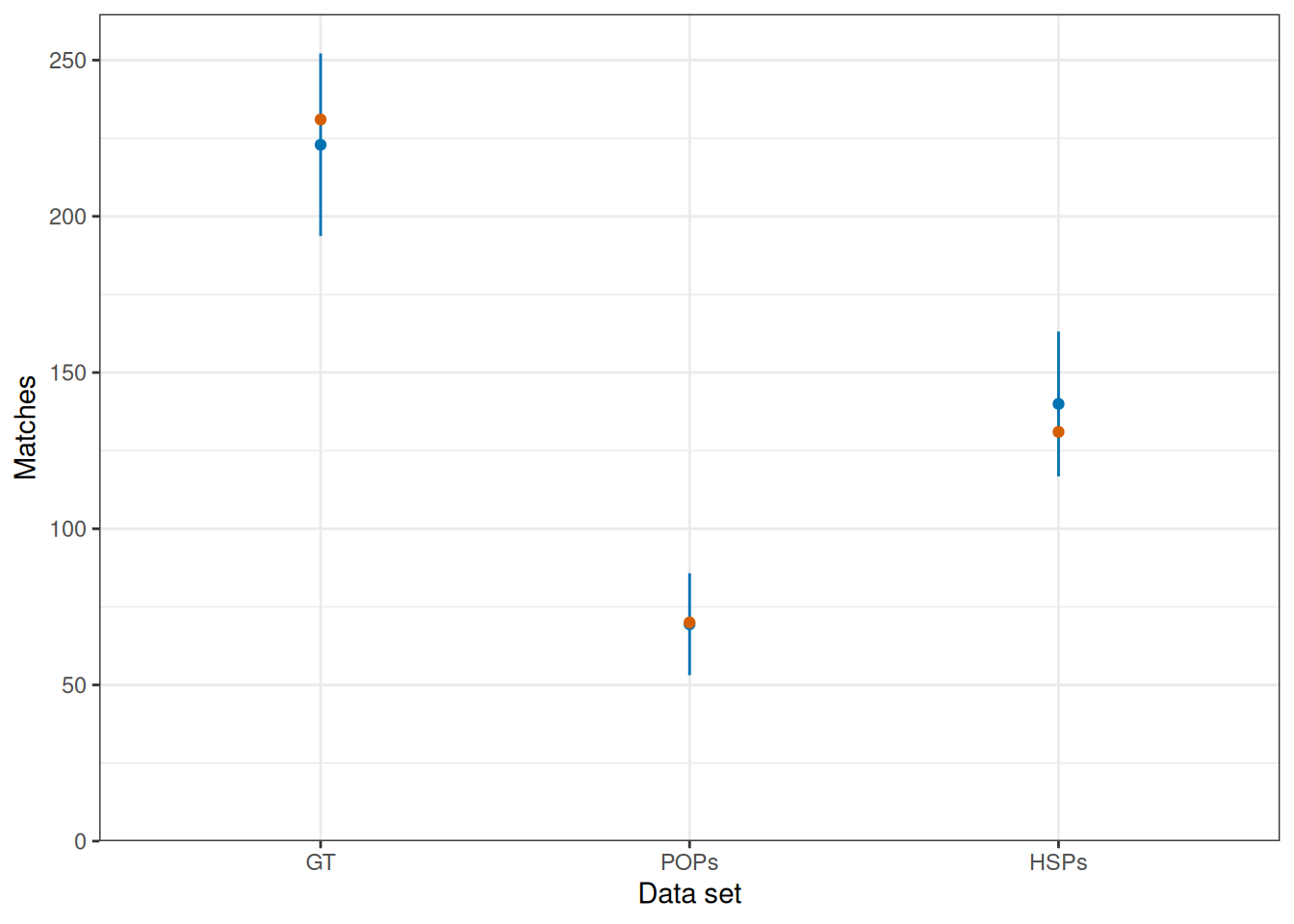
plot_hsps_residuals(fit)
Diagnostic Summary:
  SDNR: 0.89257  (95% CI 0.79062-1.02495; Target: ~1.0)
  MAR:  0.62987  (Target: ~0.67)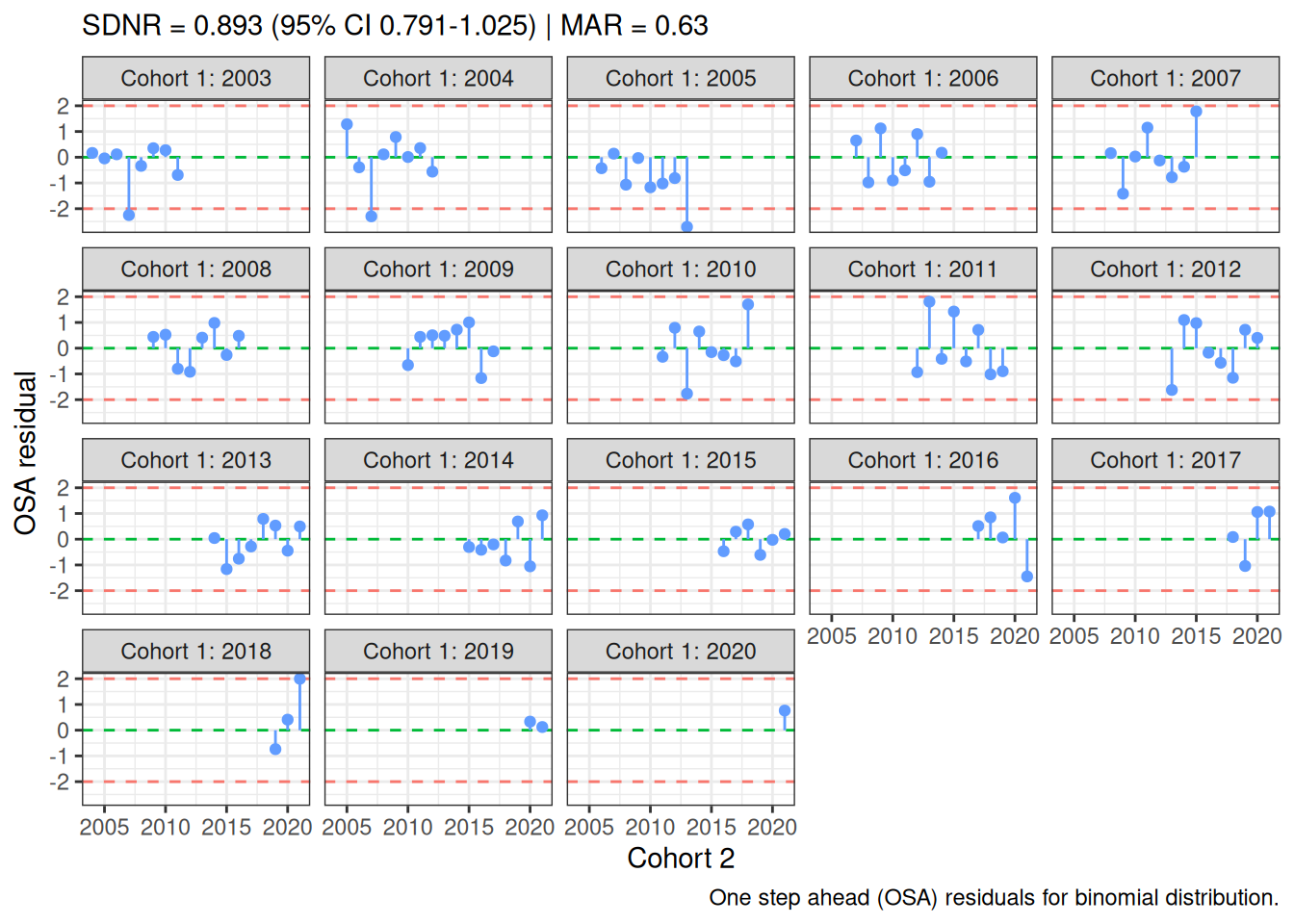
plot_gt_residuals(fit)
Diagnostic Summary:
  SDNR: 0.76530  (95% CI 0.50600-1.55760; Target: ~1.0)
  MAR:  0.48684  (Target: ~0.67)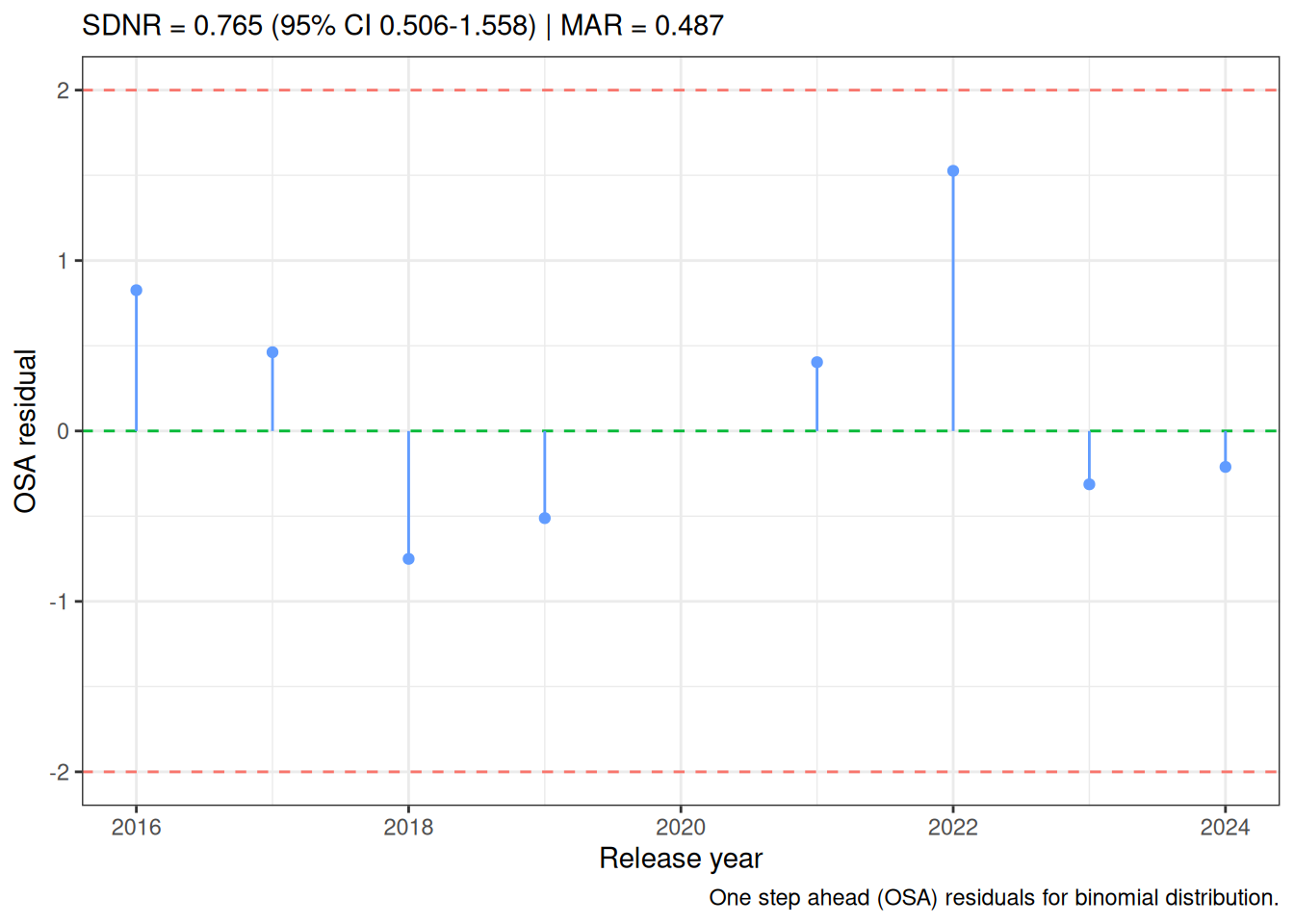
Derived quantities
The following plots demonstrate derived-quantity APIs using the same simulated MLE; they are not stock-assessment estimates. Recruitment deviates and recruitment are shown in Figure 24 and Figure 25. Natural mortality at age is shown in Figure 26, initial numbers at age in Figure 27, and harvest rates in Figure 28.
plot_rec_devs(fit)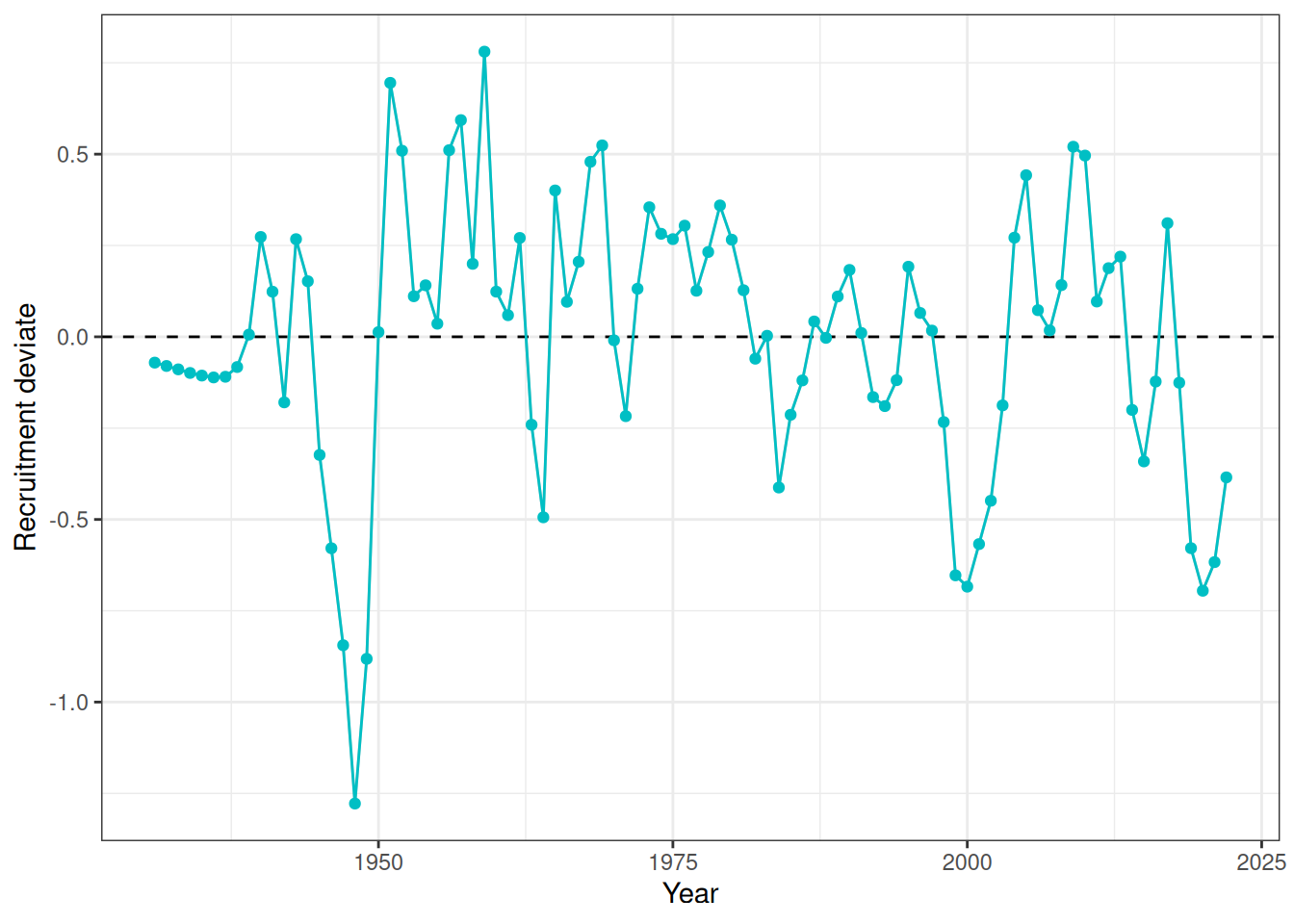
plot_recruitment(fit)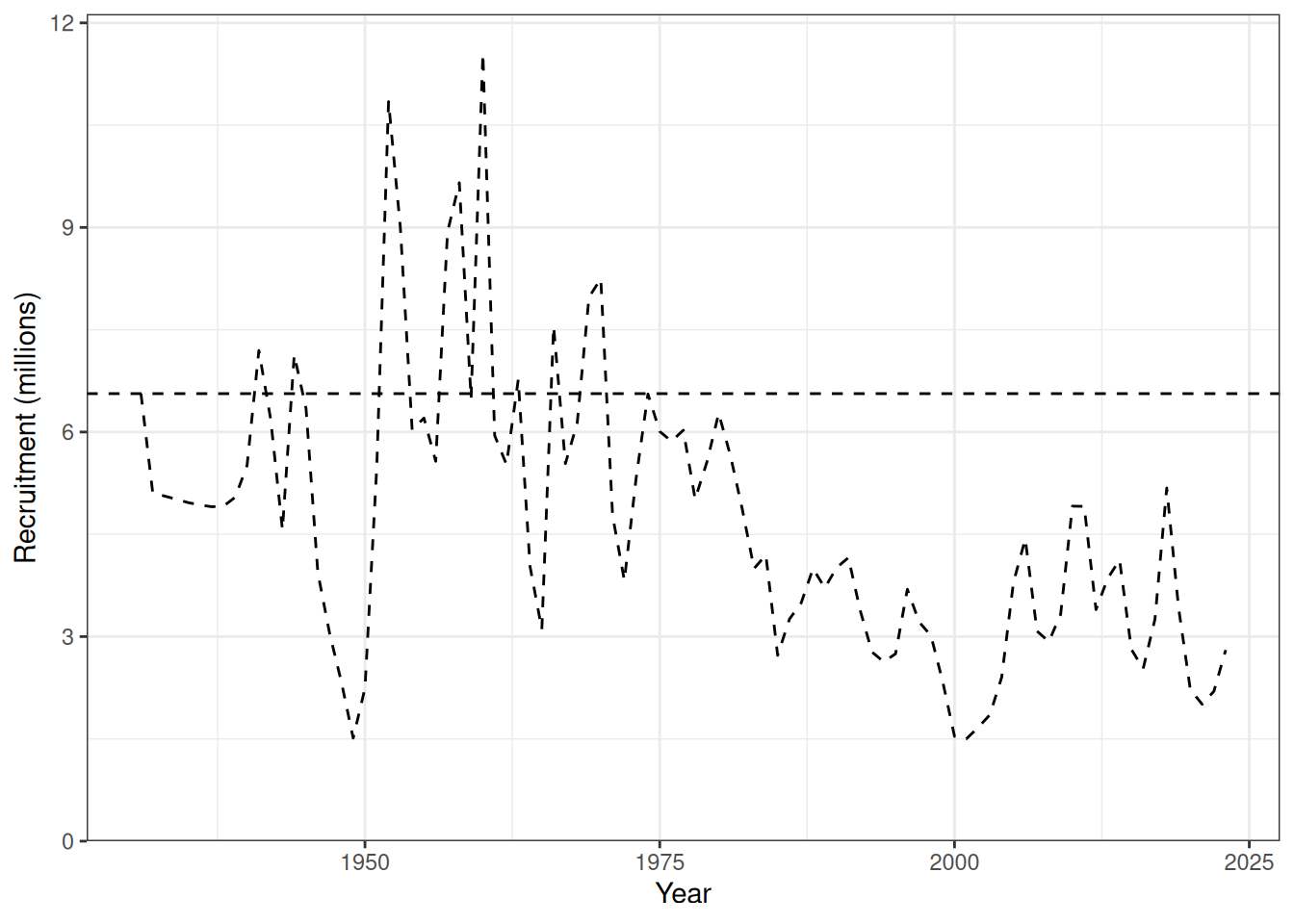
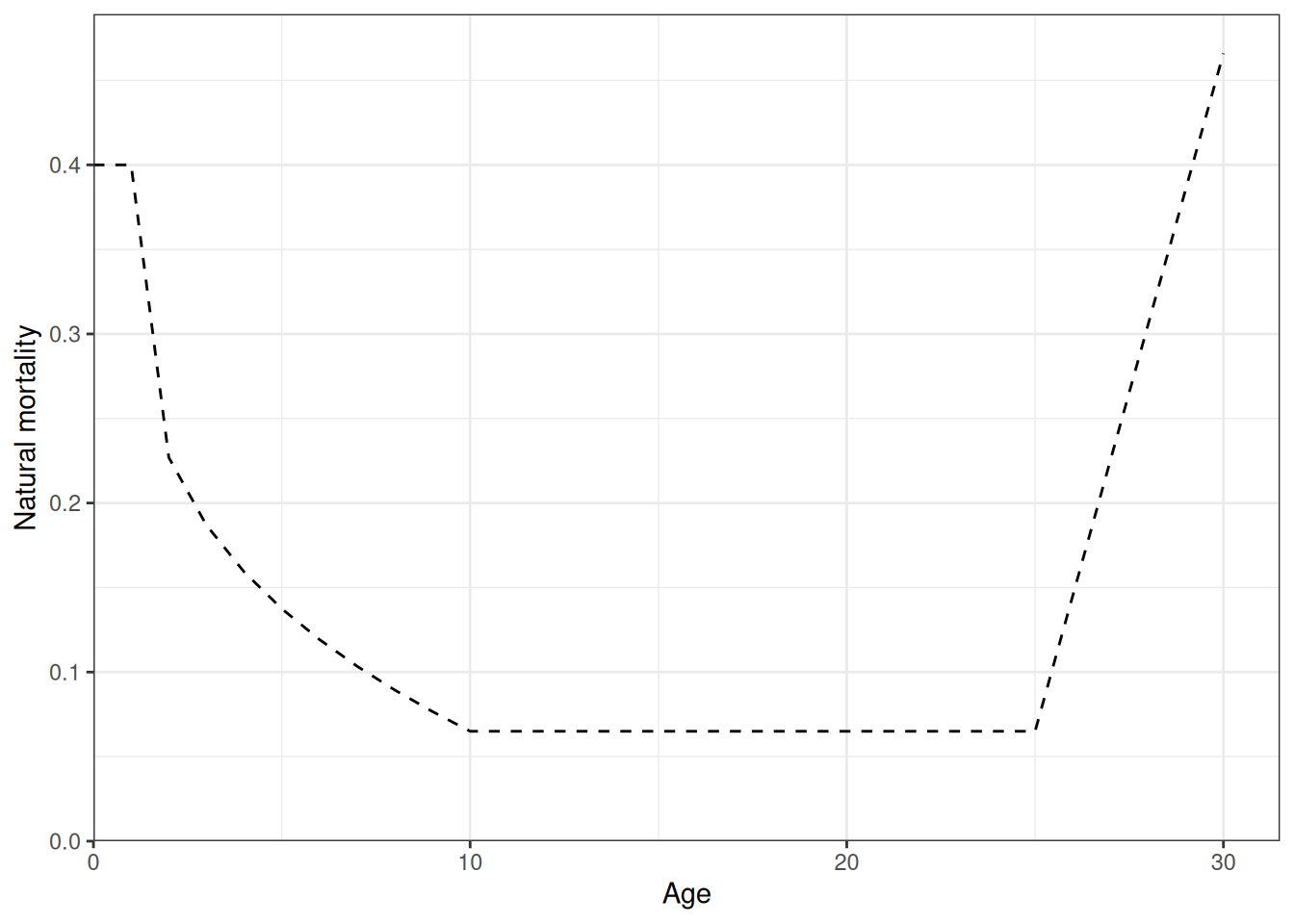
plot_initial_numbers(fit)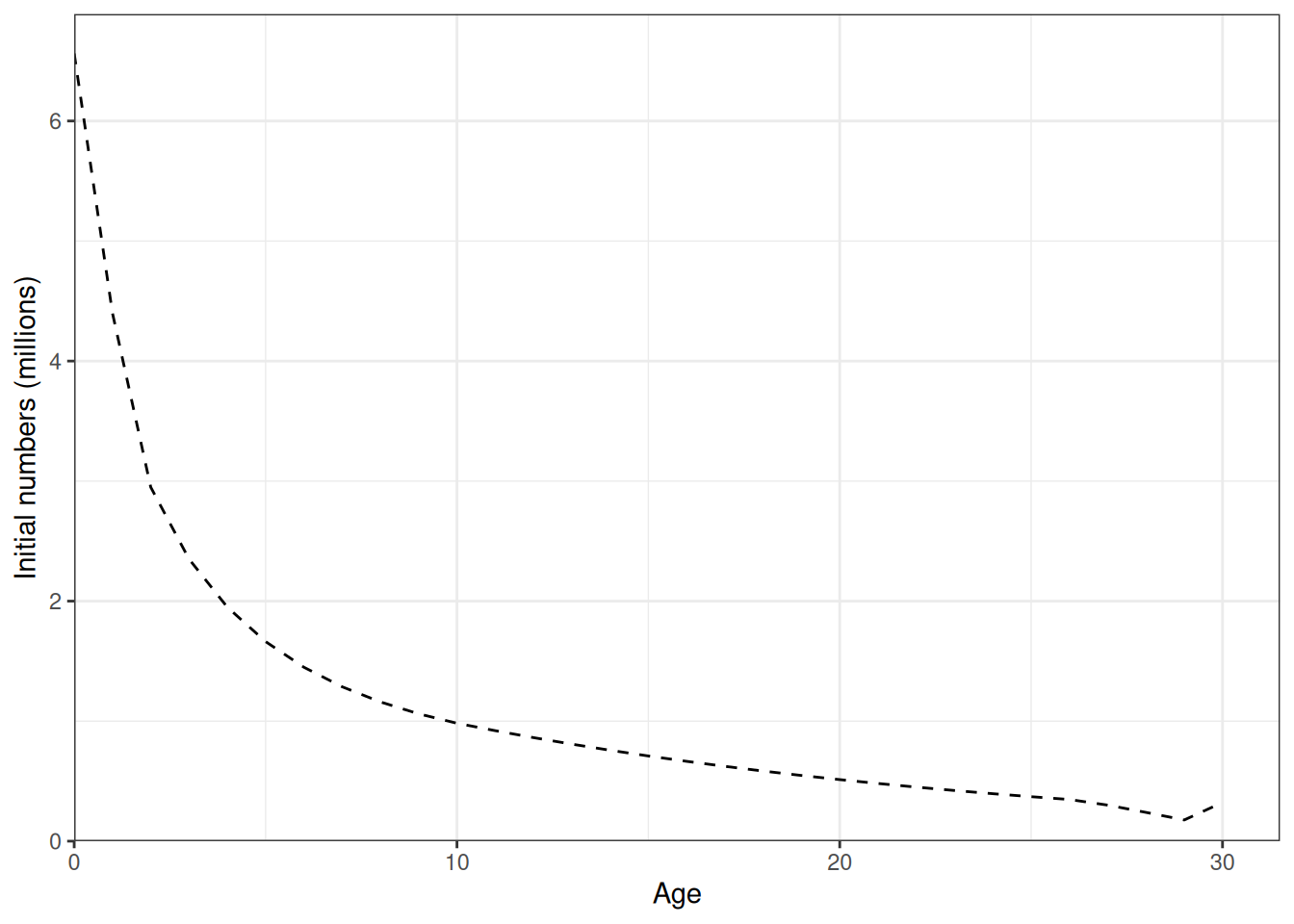
plot_hrate(fit, years = 1990:2010)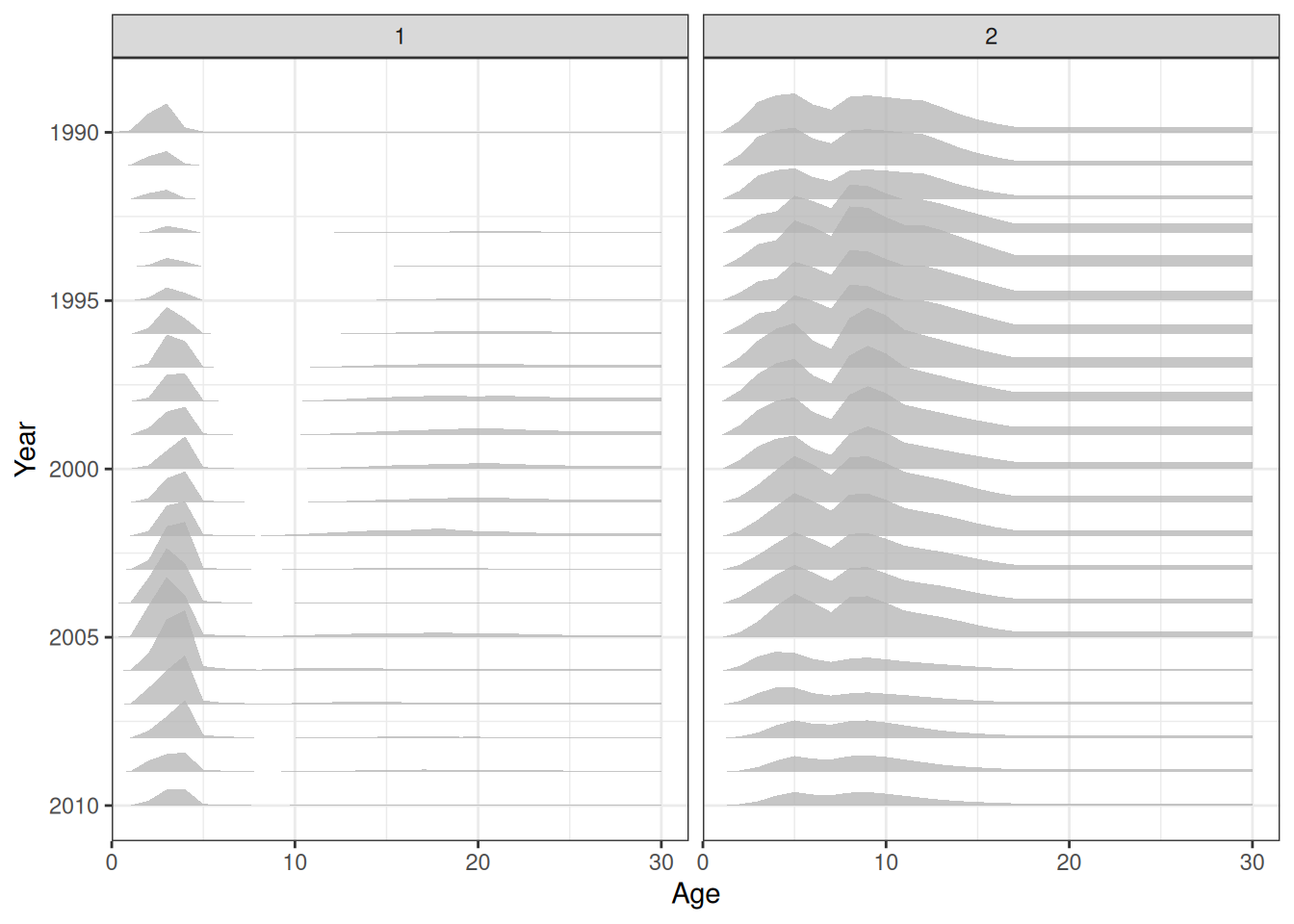
In the plots below, the different coloured blocks of years indicate blocks of parameters, vertical dashed lines indicate the minimum and maximum ages over which selectivity is estimated, and crosses to the left indicate that LF data is available during that year. Selectivity at age by year is shown for LL1 (Figure 29), LL2 (Figure 30), LL3 (Figure 31), LL4 (Figure 32), Indonesian (Figure 33), Australian (Figure 34), and CPUE (Figure 35). The panels are restricted to the configured selectivity change years to match the diagnostics used in the assessment scripts.
plot_selectivity(fit, years = selectivity_change_years(data, "LL1"), fisheries = "LL1")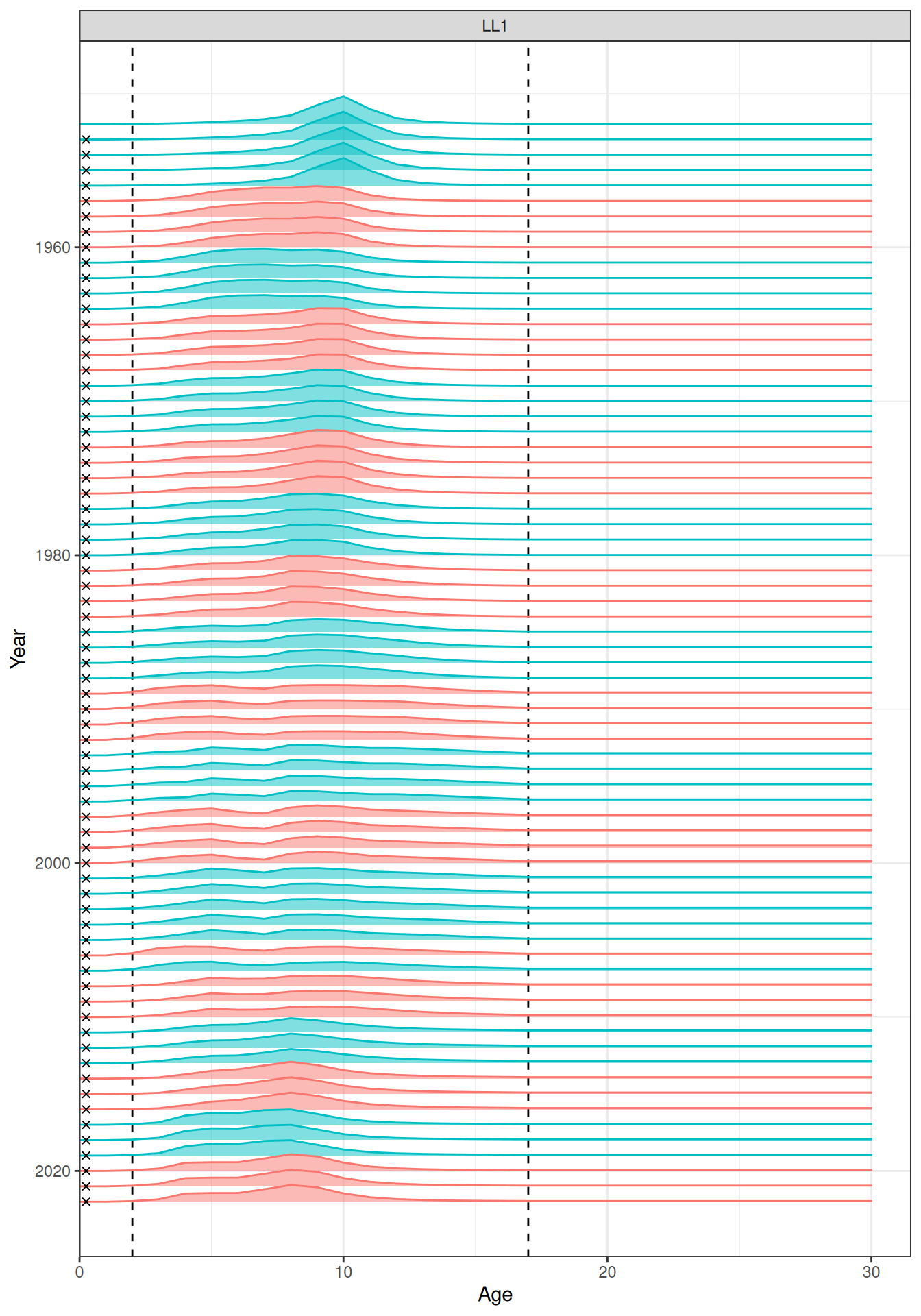
plot_selectivity(fit, years = selectivity_change_years(data, "LL2"), fisheries = "LL2")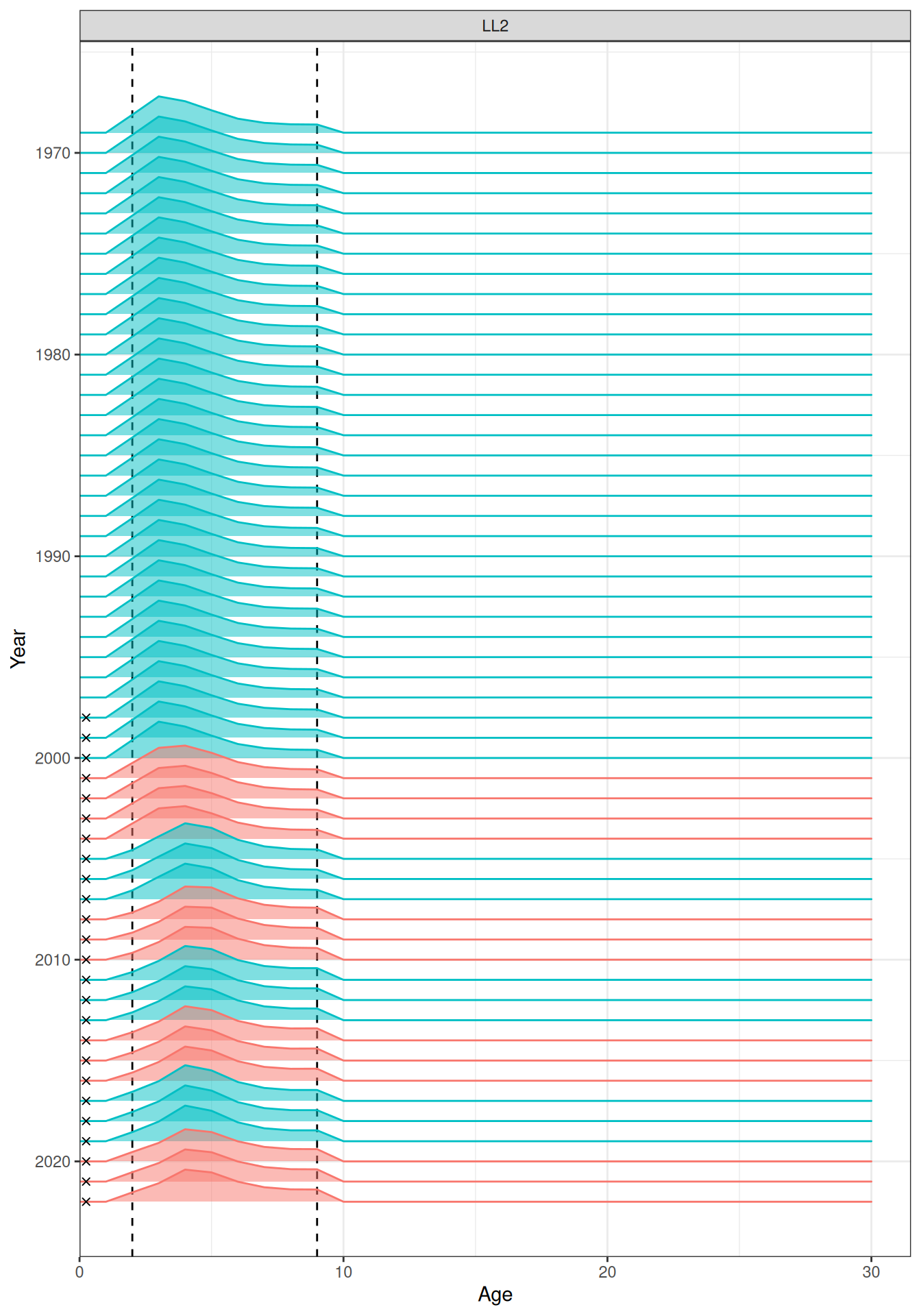
plot_selectivity(fit, years = selectivity_change_years(data, "LL3"), fisheries = "LL3")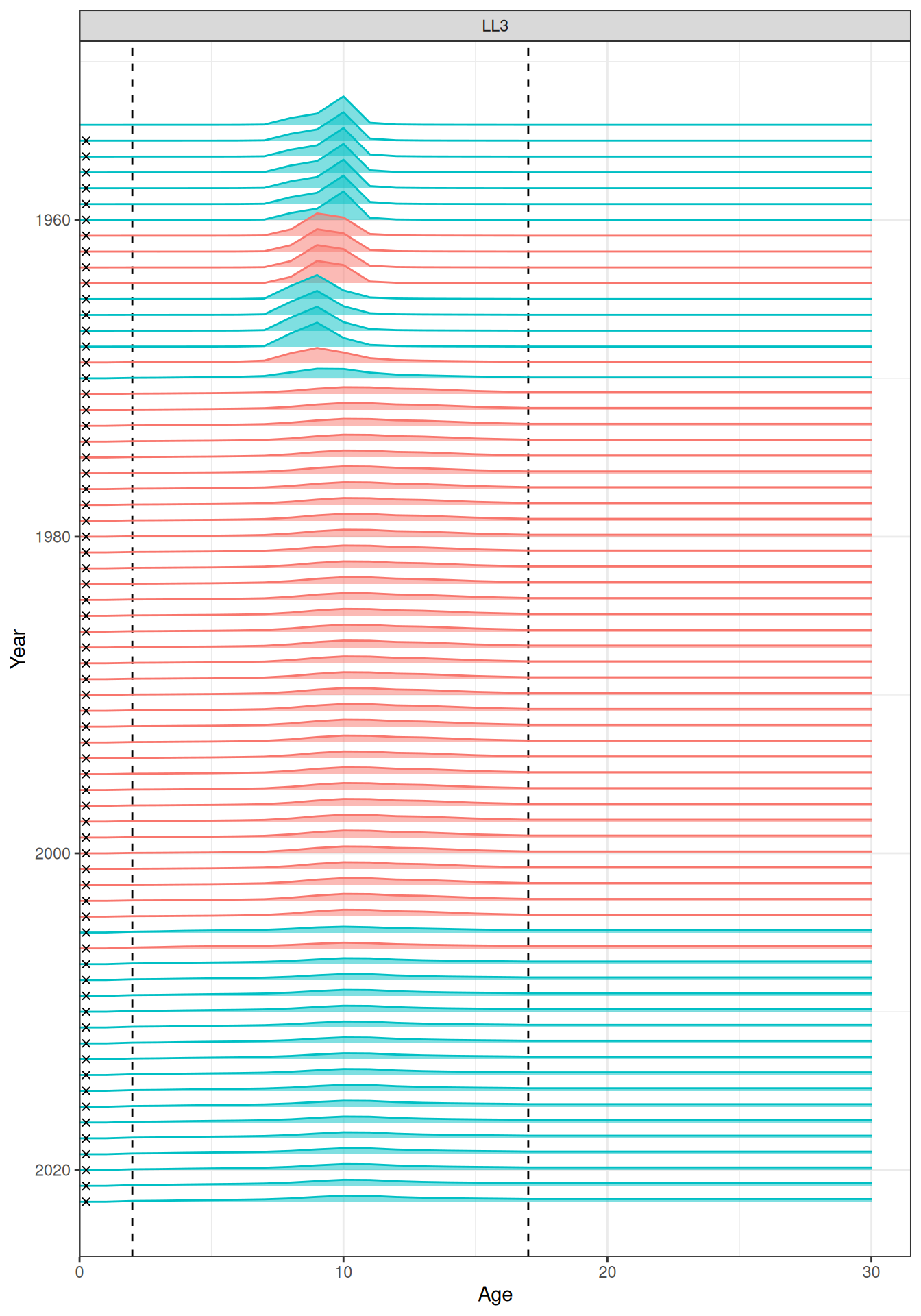
plot_selectivity(fit, years = selectivity_change_years(data, "LL4"), fisheries = "LL4")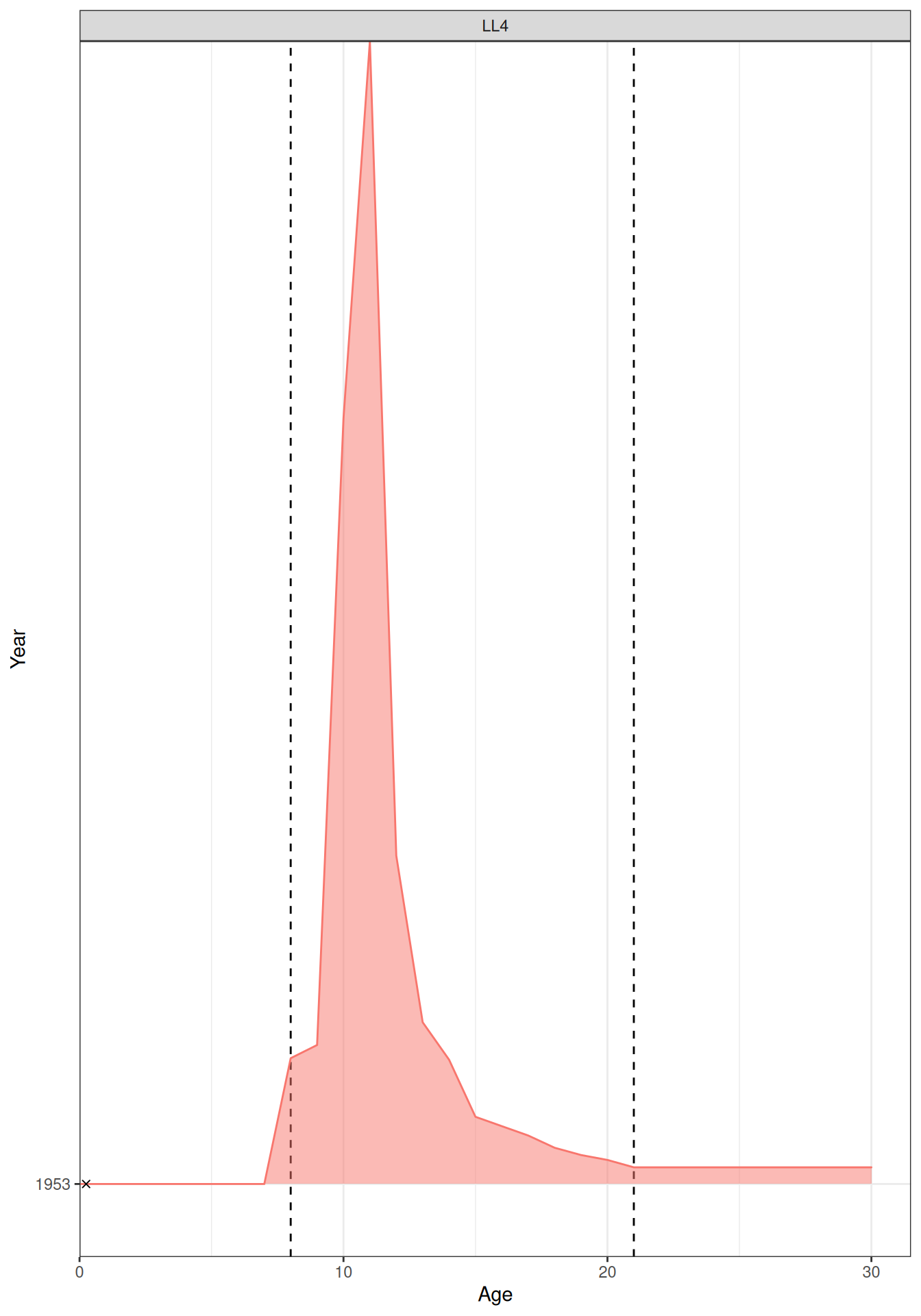
plot_selectivity(fit, years = selectivity_change_years(data, "Indonesian"), fisheries = "Indonesian")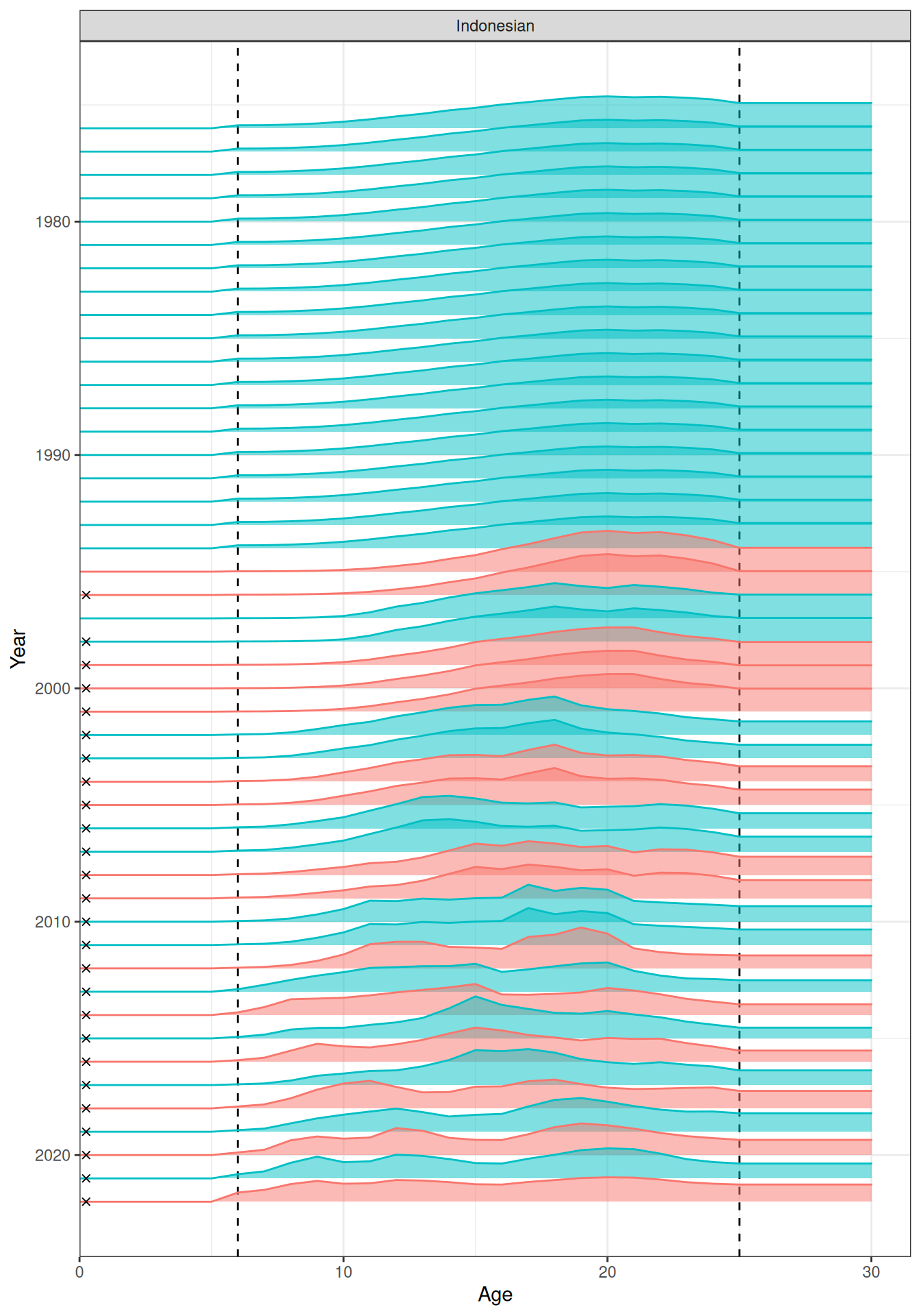
plot_selectivity(fit, years = selectivity_change_years(data, "Australian"), fisheries = "Australian")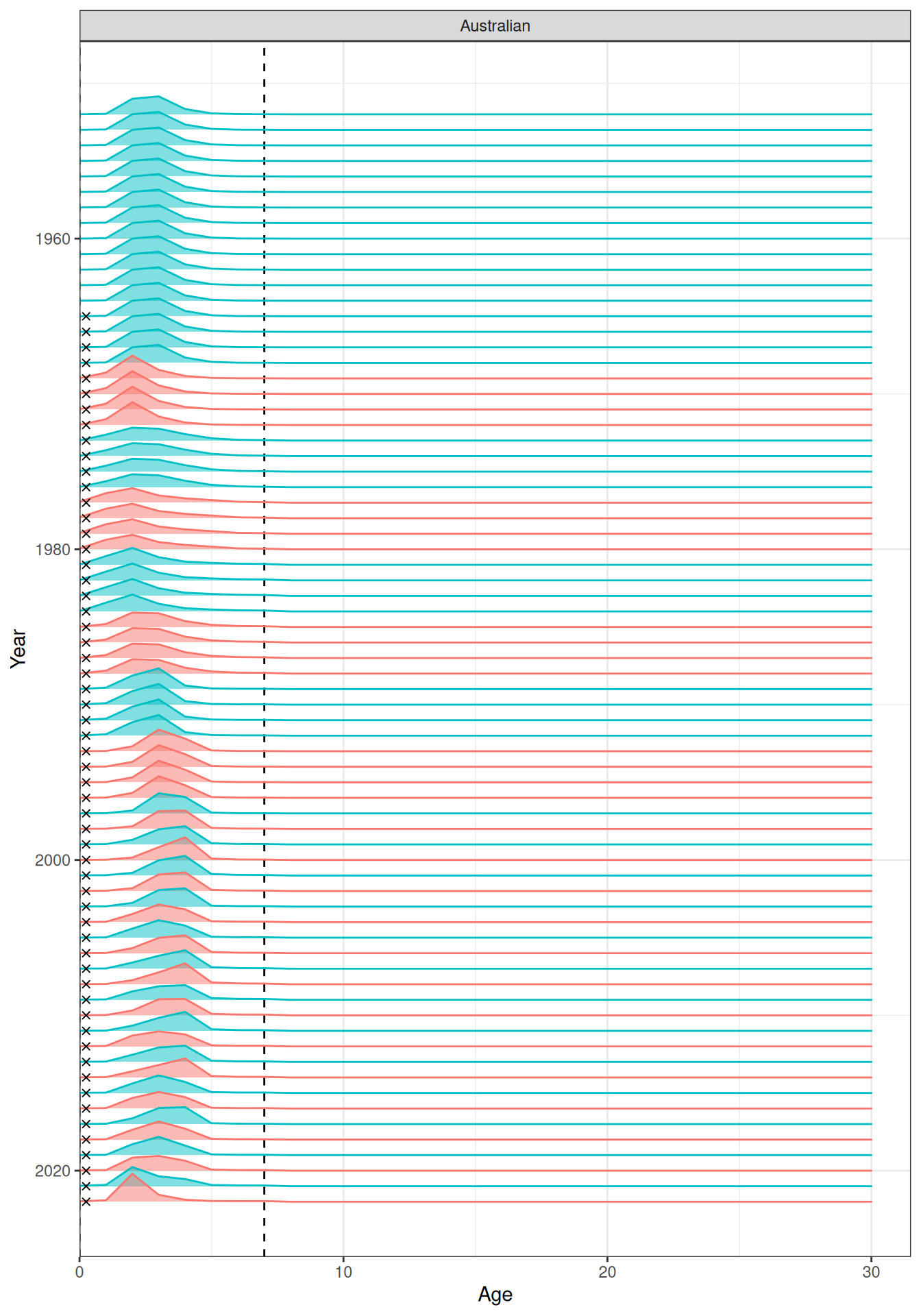
plot_selectivity(fit, years = selectivity_change_years(data, "CPUE"), fisheries = "CPUE")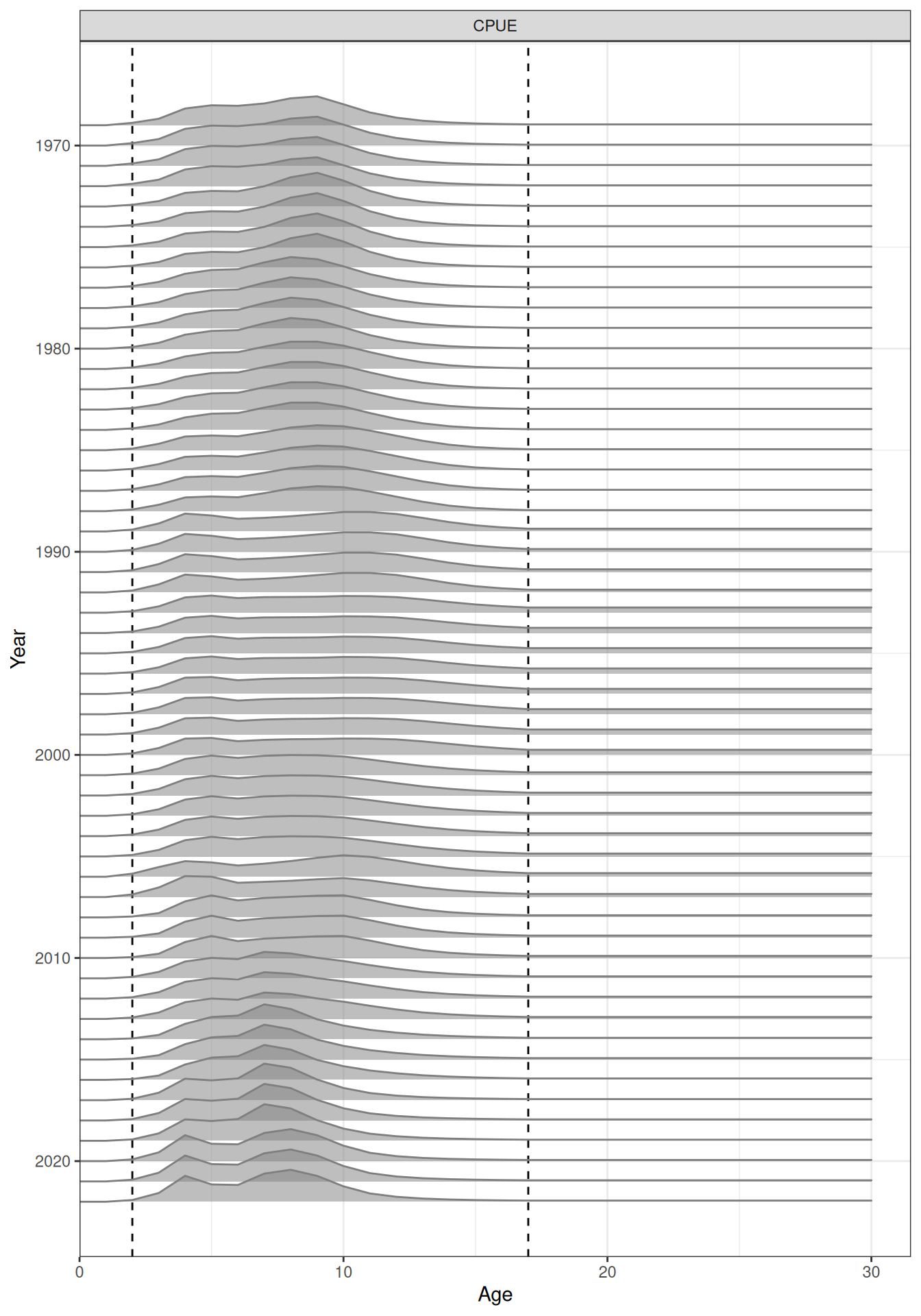
Likelihood profiles
The bundled simulated fit estimates par_log_B0, par_log_m10, and par_log_m30, so it can be used to learn the profiling workflow. The chunks remain unevaluated because a full profile requires repeated optimisation.
Use sbtprofile() with a fitted model in which the target parameter is estimated. The ytol argument defines the objective-function range to explore. Specify either name, for a uniquely named parameter, or lincomb, for a linear combination such as one element of a repeated selectivity block. Profiles are likelihood diagnostics and must not be interpreted as marginal posterior densities.
fit <- sbt_fit_read("base-model.sbt.rds", strict = TRUE)
profile_obj <- sbt_obj(fit, fresh = TRUE)
prof_B0 <- sbtprofile(
  obj = profile_obj,
  name = "par_log_B0",
  ytol = 9
)
plot_profile(
  obj = profile_obj,
  x = prof_B0 |> dplyr::filter(is.finite(value)),
  xlab = "B0"
)
Before interpreting a profile, confirm that all likelihood components remain finite over the displayed range and that the optimiser converged at every profile point. Keep the plot bounds close to the supported finite region rather than allowing remote prior tails or failed points to dominate the horizontal scale.
Recovery of relative TRO
Because the observations were simulated from an sbt operating model, the generating relative total reproductive output (TRO) is known. The fitted MLE below is based on the same simulated realisation created at the start of this vignette. This comparison is a recovery check for the example, not a southern bluefin tuna stock-status result.
fitted_report <- sbt_fit_report(fit)
tro_comparison <- tibble(
  Year = truth$year,
  `Generating model` = truth$relative_tro,
  `Fitted MLE` = as.numeric(
    fitted_report$spawning_biomass_y / fitted_report$B0
  )
) |>
  pivot_longer(
    -Year,
    names_to = "Series",
    values_to = "Relative_TRO"
  )

ggplot(
  tro_comparison,
  aes(x = Year, y = Relative_TRO, colour = Series, linetype = Series)
) +
  geom_line(linewidth = 0.8) +
  scale_colour_manual(
    values = c("Generating model" = "black", "Fitted MLE" = "#0072B2")
  ) +
  scale_linetype_manual(
    values = c("Generating model" = "dashed", "Fitted MLE" = "solid")
  ) +
  scale_x_continuous(breaks = scales::pretty_breaks()) +
  scale_y_continuous(
    limits = c(0, NA),
    expand = expansion(mult = c(0, 0.05))
  ) +
  labs(x = "Year", y = "Relative TRO", colour = NULL, linetype = NULL)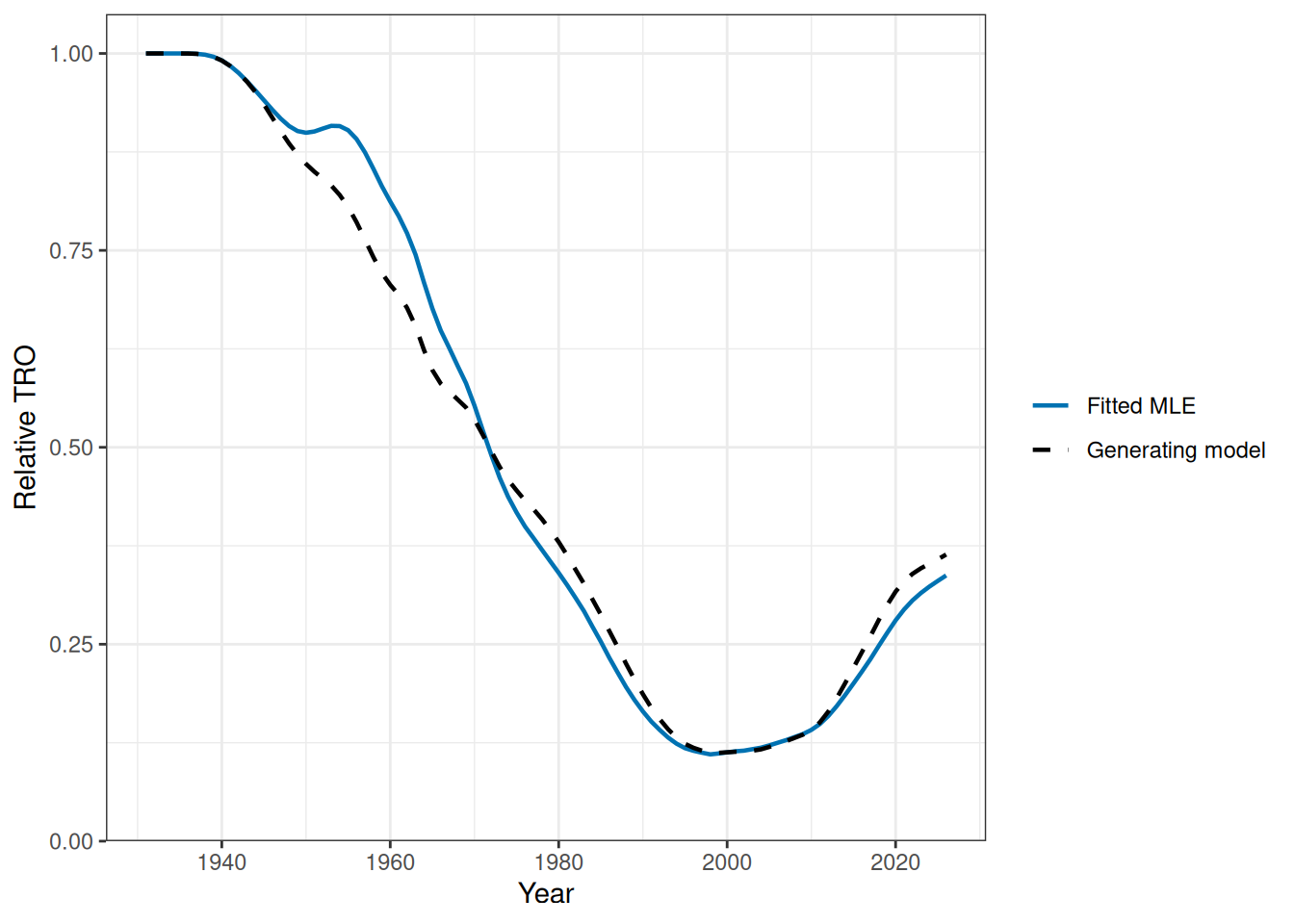
The terminal generating relative TRO is 0.364, compared with 0.337 for the fitted MLE. The root-mean-square difference across the full trajectory is 0.043.
References
Anon. 2023. Report of the Thirteenth Operating Model and Management Procedure Technical Meeting. 19-23 June 2023, Seattle, USA. https://www.ccsbt.org/sites/default/files/userfiles/file/docs_english/meetings/meeting_reports/ccsbt_30/report_of_OMMP13.pdf.
Anon. 2024. Report of the Fourteenth Operating Model and Management Procedure Technical Meeting. 24-28 June 2024, Seattle, USA. https://www.ccsbt.org/sites/default/files/userfiles/file/docs_english/meetings/meeting_reports/ccsbt_31/report_of_OMMP14.pdf.
Commission for the Conservation of Southern Bluefin Tuna. 2023. Report of the Twenty-Eighth Meeting of the Scientific Committee. 28 August - 2 September 2023, Incheon, South Korea. https://www.ccsbt.org/sites/default/files/userfiles/file/docs_english/meetings/meeting_reports/ccsbt_30/report_of_SC28.pdf.
Commission for the Conservation of Southern Bluefin Tuna. 2026. Latest Stock Assessment. https://www.ccsbt.org/en/content/latest-stock-assessment.
Hillary, Richard M., and A. L. Preece. 2020. An Updated Assessment of the Stock Status of Southern Bluefin Tuna in 2020. CCSBT-ESC/2008/12. Commission for the Conservation of Southern Bluefin Tuna. https://www.ccsbt.org/system/files/ESC25_12_AUandJP_StockAssessment2020_Rev2_0.pdf.
Hillary, Richard M., A. L. Preece, Norio Takahashi, Campbell R. Davies, and Takehiro Itoh. 2023. The Southern Bluefin Tuna Stock Assessment in 2023. CCSBT-ESC/2308/16. Commission for the Conservation of Southern Bluefin Tuna. https://www.ccsbt.org/system/files/2023-08/ESC28_16_stockAssessment2023.pdf.
Kristensen, Kasper. 2026. RTMB: ’R’ Bindings for ’TMB’. https://doi.org/10.32614/CRAN.package.RTMB.
Kristensen, Kasper, Anders Nielsen, Casper W. Berg, Hans Skaug, and Bradley M. Bell. 2016. “TMB: Automatic Differentiation and Laplace Approximation.” Journal of Statistical Software 70 (5): 1–21. https://doi.org/10.18637/jss.v070.i05.
R Core Team. 2026. R: A Language and Environment for Statistical Computing. R Foundation for Statistical Computing. https://www.R-project.org/.